Extension API
Build custom data providers, broker integrations, indicators, and more with the WealthLab extension framework.
Start with a working extension
Explore our extension demo project on GitHub for sample code and a head start on your own WealthLab extensions.
Position ScoreCard API
A Position ScoreCard Extension defines one or more Performance Metrics that are calculated for individual Positions in a backtest. Examples of Position-level metrics include:
- Profit
- MAE
- Profit Per Bar
Users can select which Position Metrics to display in the Positions Visualizer. Position Metrics can also be consumed by other Visualizers, such as the Position Metrics Visualizer in the Power Pack extension.
Build Environment
You can create a Position ScoreCard in a .NET development tool such as Visual Studio 2026.
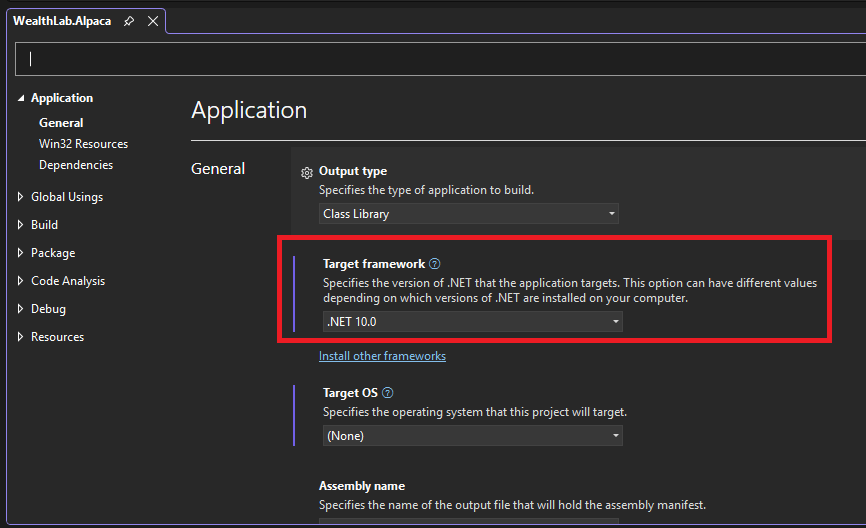
Create a class library project that targets .NET10, then reference the WealthLab.Core library DLL that you'll find in the WL9 installation folder.
Your Position ScoreCard will be a class in this library that descends from PositionScoreCardBase, which is defined in the WealthLab.Core library, in the WealthLab.Backtest namespace. After you implement and build your library, simply copy the resulting assembly DLL into the WL9 installation folder. The next time WL9 starts up, it will discover your Position ScoreCard, making it available in appropriate locations of the WL9 user interface.
Accessing the Host (WL9) Environment
The IHost interface provides access to the current WealthLab environment. Extensions can use it to retrieve application-level information and services, such as the location of the user's WealthLab data folder or the DataSets defined by the user.
You can access the current IHost instance from anywhere in your extension through the WLHost singleton and its Instance property. For example, the following code retrieves the path to the user's WealthLab data folder:
string folder = WLHost.Instance.DataFolder;
Use WLHost.Instance whenever your extension needs access to functionality exposed by the IHost interface.
Descriptive Properties
Name
public abstract string Name
Override this property to return the name of the Position ScoreCard. The name appears in the Position Metrics Preferences page, where users select which Position Metrics should be available in the Positions Visualizer.
PositionMetricNames
public abstract List<string> PositionMetricNames
Override this property to return the names of the Position Metrics calculated by your ScoreCard. For example:
public override List<string> PositionMetricNames =>
    new List<string>
    {
        "My Metric",
        "My Other Metric"
    };
The names returned here are passed back to your ScoreCard through CalculatePositionMetric, ColorizeMetric, and DecimalsMetric.
Calculating Position Metrics
public abstract double CalculatePositionMetric(
    Backtester bt,
    Position pos,
    string metricName)
Override this method to calculate the Position Metric identified by metricName for the supplied Position. The parameters provide:
- bt - The Backtester that generated the backtest results.
- pos - The Position for which the metric should be calculated.
- metricName - The name of the metric being requested.
Return the calculated value as a double. If your Position ScoreCard supplies more than one metric, use metricName to determine which calculation to perform. For example:
public override double CalculatePositionMetric(
    Backtester bt,
    Position pos,
    string metricName)
{
    switch (metricName)
    {
        case "My Metric":
            // Calculate and return the metric.
            return 0.0;

        case "My Other Metric":
            // Calculate and return the metric.
            return 0.0;
    }

    return Double.NaN;
}
Metric Display Properties
ColorizeMetric
public abstract bool ColorizeMetric(string metric)
Return true if the specified metric should be colorized according to whether its value represents a profit or loss when displayed in the Positions Visualizer. When enabled, positive and negative values are displayed using the corresponding profit/loss coloring. Return false for metrics where this coloring would not be meaningful.
DecimalsMetric
public abstract int DecimalsMetric(string metric)
Return the number of decimal places WealthLab should use when displaying the specified Position Metric. For example:
public override int DecimalsMetric(string metric)
{
    if (metric == "Profit Percent")
        return 2;

    return 0;
}
Different metrics supplied by the same Position ScoreCard can use different display precision.
Need help developing an extension?
Ask the WealthLab community or work with our team on a custom solution.