Team
I am STUNNED at how fast you have been developing WL9 - I just looked through the changelog. I can't begin to imagine how hard it was to integrate with Claude Code - you guys are geniuses.
I didn't see anywhere about compatibility with WL8 systems and code - is it fully compatible? Is there any reason to still use WL8?
Thanks and regards
Rod
PS: I have seen the migration tool - nice one. I note the Strategy Monitor required a restart. Sorted.
I am STUNNED at how fast you have been developing WL9 - I just looked through the changelog. I can't begin to imagine how hard it was to integrate with Claude Code - you guys are geniuses.
I didn't see anywhere about compatibility with WL8 systems and code - is it fully compatible? Is there any reason to still use WL8?
Thanks and regards
Rod
PS: I have seen the migration tool - nice one. I note the Strategy Monitor required a restart. Sorted.
Rename
Thank you! Yes WL9 is fully compatible with WL8. The only reason to keep using WL8 would be if you’re waiting for certain finantic extensions.
Thanks boss!
Sorry one more questiinm. After the migration now my Strategy Monitor entries have all disappeared from WL8. What is the name of the file that manages this? I assume I can just copy back from WL9?
The migration doesn’t move anything, it only copies files. And Strategy Monitor entries are stored as part of a Workspace. So you have any Workspaces saved and can you try to open one to get your items back?
Thanks. It didn't work when I reopened the workspace. I think I must have accidentally cleared the workspace, but I've got it all in WealthLab 9. I tried to copy that workspace file over, but it doesn't work in WealthLab 8, so I guess I'll just use WealthLab 9!
You won’t be able to copy things back from WL9 to WL8, it’s not forward compatible but it is backward compatible.
Hi. I am trying to find out how to use the MCP in Claude, and in general the AI capabilities of Wealth Lab 9. The AI assistant doesnt mention it, and I dont see any instructions anywhere.
Where is the documentation (even if only a page or two) please? Thanks and regards
Rod
Where is the documentation (even if only a page or two) please? Thanks and regards
Rod
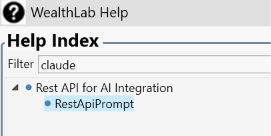
Thanks. That helps. I pasted the whole thing into Claude and it said:
"I found that WealthLab 9 exposes a local web service I can call directly—no installation needed—giving me access to your datasets and 283 saved strategies. This means I can compile and run backtests myself, reading results and debug output before looping you in, instead of the old back-and-forth where you'd paste errors back to me."
"I found that WealthLab 9 exposes a local web service I can call directly—no installation needed—giving me access to your datasets and 283 saved strategies. This means I can compile and run backtests myself, reading results and debug output before looping you in, instead of the old back-and-forth where you'd paste errors back to me."
It seems to work. Claude is failing on Meta strategies though - are they meant to work yet? Thanks
"The Meta run came back broken—just one trade executed, 48 skipped for insufficient cash, and an implausible commission figure. I'll test the individual components in isolation before drawing conclusions.
I can't give you a reliable Meta figure. WealthLab 9's connection doesn't run Meta strategies properly. My run of TrendR_meta over the last 8 years came back as nonsense: one trade, 48 trades skipped for lack of cash, and an impossible commission figure. The combined Meta number has to come from the WealthLab 9 screen.
Each of the five strategies inside the Meta runs correctly on its own."
"The Meta run came back broken—just one trade executed, 48 skipped for insufficient cash, and an implausible commission figure. I'll test the individual components in isolation before drawing conclusions.
I can't give you a reliable Meta figure. WealthLab 9's connection doesn't run Meta strategies properly. My run of TrendR_meta over the last 8 years came back as nonsense: one trade, 48 trades skipped for lack of cash, and an impossible commission figure. The combined Meta number has to come from the WealthLab 9 screen.
Each of the five strategies inside the Meta runs correctly on its own."
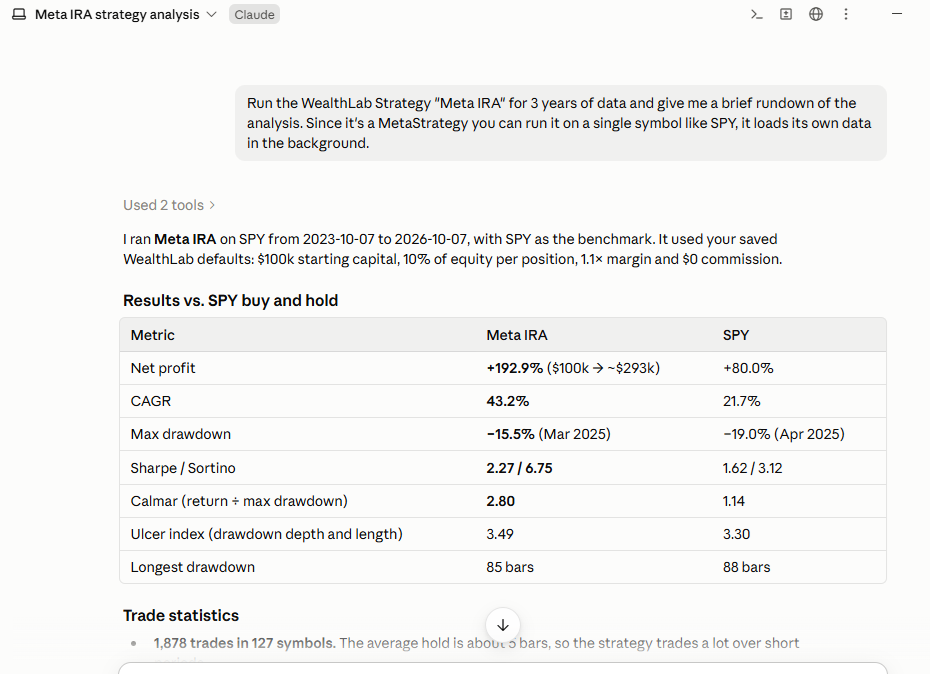
I can't say I'm seeing the same problem...
@rbryant -
If you haven't, clear "Claude" from the Help filter.
Altogether, there are 3 prompts to copy into Claude.
If you haven't, clear "Claude" from the Help filter.
Altogether, there are 3 prompts to copy into Claude.
Thanks will try.
And wow, what a system you have with Meta IRA!
I tried with all the relevant prompts pasted in. I still get an issue with the Meta Strategies. Claude wrote this bug report:
Subject: WL9 REST API and MCP - MetaStrategy backtests break position sizing (orders of ~3e26 shares)
WealthLab 9, version 9.0.10.0, Windows 11. Tested through the local REST API
(http://localhost:7240/backtest) and through the MCP server's run_backtest tool
(http://localhost:7240/mcp). Both give identical results.
Summary
When I backtest a saved MetaStrategy through the REST API or the MCP server, the first few
trades are sized normally. After that, every order is sized at about 3 x 10^26 shares. None of
those orders can be funded, so nearly every later trade is rejected as NSF and the backtest is
effectively empty. Each component strategy of the same MetaStrategy runs normally through the
API on its own.
How I ran it
- A saved MetaStrategy with four components. Each component is a Building Block strategy
trading one ETF (single-symbol mode).
- POST /backtest (or MCP run_backtest) with "strategyName" set to the MetaStrategy, a DataSet
name, from/to dates covering ten years, "marginFactor": 1.1, and backtestSettings with
commission and slippage switched off (commissionType 0, slippage disabled). Then I polled
GET /backtest/{jobID} until status was 1.
Expected
Roughly the same trades as running the MetaStrategy in the WealthLab 9 window: hundreds of
trades over ten years.
Actual
- 4 positions and 412 NSF positions; APR about 0%.
- The 4 positions are all in one symbol, normally sized (about 1,600 shares each), in the
first three months.
- After that every order is NSF. The pending signal at the end of the run is a Sell at
MarketClose for 3.196e+26 shares.
- The MCP server's run_backtest returns the same 4 positions, the same 412 NSF and the same
3.196e+26-share pending order.
- With commission switched on, commission seems to be charged on the rejected orders too.
With a flat $1 per trade, Commission came to $831 for only 4 positions. With per-share
commission, it came to about 2.6e25.
What I varied - all gave the same broken result (4 trades, about 412 NSF)
- No commission and no slippage
- Flat $1 commission
- Per-share commission ($0.005, $0.70 minimum)
- positionSize of 100% of equity, max 4 open (the MetaStrategy's saved settings)
- No positionSize sent at all
- strategyWindowHandle "New" (run in a visible Strategy window): 2 trades, 414 NSF
A second MetaStrategy with five single-symbol components shows the same pattern: 1 trade,
48 NSF, and Commission of about 8.6e72.
Components on their own
Each component strategy, run by name through the same API on its own symbol, gives normal
results. For example, one component gives 109 trades and 0 NSF over the same ten years.
Question
Does the API support MetaStrategies? If it does, is there a request setting it needs that I'm
missing, such as a particular positionSize or dataSetName? I was told MetaStrategies work
through the API. A working example request would let me find the difference.
And wow, what a system you have with Meta IRA!
I tried with all the relevant prompts pasted in. I still get an issue with the Meta Strategies. Claude wrote this bug report:
Subject: WL9 REST API and MCP - MetaStrategy backtests break position sizing (orders of ~3e26 shares)
WealthLab 9, version 9.0.10.0, Windows 11. Tested through the local REST API
(http://localhost:7240/backtest) and through the MCP server's run_backtest tool
(http://localhost:7240/mcp). Both give identical results.
Summary
When I backtest a saved MetaStrategy through the REST API or the MCP server, the first few
trades are sized normally. After that, every order is sized at about 3 x 10^26 shares. None of
those orders can be funded, so nearly every later trade is rejected as NSF and the backtest is
effectively empty. Each component strategy of the same MetaStrategy runs normally through the
API on its own.
How I ran it
- A saved MetaStrategy with four components. Each component is a Building Block strategy
trading one ETF (single-symbol mode).
- POST /backtest (or MCP run_backtest) with "strategyName" set to the MetaStrategy, a DataSet
name, from/to dates covering ten years, "marginFactor": 1.1, and backtestSettings with
commission and slippage switched off (commissionType 0, slippage disabled). Then I polled
GET /backtest/{jobID} until status was 1.
Expected
Roughly the same trades as running the MetaStrategy in the WealthLab 9 window: hundreds of
trades over ten years.
Actual
- 4 positions and 412 NSF positions; APR about 0%.
- The 4 positions are all in one symbol, normally sized (about 1,600 shares each), in the
first three months.
- After that every order is NSF. The pending signal at the end of the run is a Sell at
MarketClose for 3.196e+26 shares.
- The MCP server's run_backtest returns the same 4 positions, the same 412 NSF and the same
3.196e+26-share pending order.
- With commission switched on, commission seems to be charged on the rejected orders too.
With a flat $1 per trade, Commission came to $831 for only 4 positions. With per-share
commission, it came to about 2.6e25.
What I varied - all gave the same broken result (4 trades, about 412 NSF)
- No commission and no slippage
- Flat $1 commission
- Per-share commission ($0.005, $0.70 minimum)
- positionSize of 100% of equity, max 4 open (the MetaStrategy's saved settings)
- No positionSize sent at all
- strategyWindowHandle "New" (run in a visible Strategy window): 2 trades, 414 NSF
A second MetaStrategy with five single-symbol components shows the same pattern: 1 trade,
48 NSF, and Commission of about 8.6e72.
Components on their own
Each component strategy, run by name through the same API on its own symbol, gives normal
results. For example, one component gives 109 trades and 0 NSF over the same ten years.
Question
Does the API support MetaStrategies? If it does, is there a request setting it needs that I'm
missing, such as a particular positionSize or dataSetName? I was told MetaStrategies work
through the API. A working example request would let me find the difference.
Per your earlier posts #7, 8, 9 In my trying to run strategy backtest / analyze results using the MCP in Claude I pasted the Rest APi from WL9 help into Claude and it said:
I can’t connect to localhost:7240 from this chat, so I can’t run the backtest or return results from your WealthLab instance.
Please advise.
I can’t connect to localhost:7240 from this chat, so I can’t run the backtest or return results from your WealthLab instance.
Please advise.
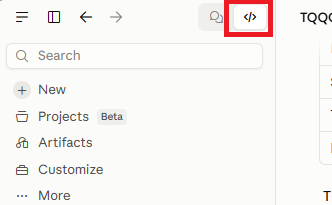
You can try using Claude CODE not Claude CHAT, that usually works. You can also ask Claude for ideas. Maybe it's a firewall issue?
Per Claude suggestions on my windows 11 the WL9 rest api connection http://localhost:7240 returns:
This localhost page can’t be found No webpage was found for the web address: http://localhost:7240/
and http://localhost:7240/mcp returns:
{"error":{"code":-32000,"message":"Bad Request: Mcp-Session-Id header is required for GET and DELETE requests when the server is using sessions. If your server doesn\u0027t need sessions, enable stateless mode by setting HttpServerTransportOptions.Stateless = true. See [link]https://csharp.sdk.modelcontextprotocol.io/concepts/stateless/stateless.html[/link] for more details."},"id":"","jsonrpc":"2.0"}
However testing cmd command says listening:
C:\Users\landa>netstat -ano | findstr :7240
TCP 127.0.0.1:7240 0.0.0.0:0 LISTENING 8600
TCP [::1]:7240 [::]:0 LISTENING 8600
So Claude suggested if the API is Running but Still Unreachable
ensure that any "API" or "Server" mode is explicitly enabled within WealthLab's internal settings, as simply opening the application may not automatically start the REST API listener. Check the application logs if available for any "Failed to bind to port" errors.
However http://localhost:7240/backtest/strategies returns properly strategies.
Same thing for indicators or datasets.
And actually using PowerShell seems to work i.e.
PS C:\Users\landa\AppData\Roaming\WealthLab9> Invoke-RestMethod -Uri "http://localhost:7240/backtest/datasets" -Method Get returns
Argentina - MerVal;Yahoo! Finance
...
DAX;WealthData
DIA+
Thank you.
This localhost page can’t be found No webpage was found for the web address: http://localhost:7240/
and http://localhost:7240/mcp returns:
{"error":{"code":-32000,"message":"Bad Request: Mcp-Session-Id header is required for GET and DELETE requests when the server is using sessions. If your server doesn\u0027t need sessions, enable stateless mode by setting HttpServerTransportOptions.Stateless = true. See [link]https://csharp.sdk.modelcontextprotocol.io/concepts/stateless/stateless.html[/link] for more details."},"id":"","jsonrpc":"2.0"}
However testing cmd command says listening:
C:\Users\landa>netstat -ano | findstr :7240
TCP 127.0.0.1:7240 0.0.0.0:0 LISTENING 8600
TCP [::1]:7240 [::]:0 LISTENING 8600
So Claude suggested if the API is Running but Still Unreachable
ensure that any "API" or "Server" mode is explicitly enabled within WealthLab's internal settings, as simply opening the application may not automatically start the REST API listener. Check the application logs if available for any "Failed to bind to port" errors.
However http://localhost:7240/backtest/strategies returns properly strategies.
Same thing for indicators or datasets.
And actually using PowerShell seems to work i.e.
PS C:\Users\landa\AppData\Roaming\WealthLab9> Invoke-RestMethod -Uri "http://localhost:7240/backtest/datasets" -Method Get returns
Argentina - MerVal;Yahoo! Finance
...
DAX;WealthData
DIA+
Thank you.
Sometimes Claude gets confused. I had it connecting seamlessly for a week straight and then out of the blue it said it had connection issues and I had to lead it using baby steps until it could connect successfully 😅
Then I asked Claude -
"can I ran from You Claude (and not from Powershell ) a request like
Invoke-RestMethod -Uri "http://localhost:7240/backtest/strategies" -Method Get |
Format-Table name, folderName, qualifiedName "
And response was -
"Not directly. I can’t send requests to localhost:7240 on your computer—localhost is only reachable from your own machine.
You can run that command in PowerShell. If you paste the output here, I can help interpret it. Also, Format-Table is PowerShell formatting, so it should be run in PowerShell rather than sent as an API request. "
Claude suggests a need for MCP server that acts as a bridge to localhost:7240 allowing Claude to make HTTP requests to that address.
Wonder if any easier suggestions to get Claude connection ?
"can I ran from You Claude (and not from Powershell ) a request like
Invoke-RestMethod -Uri "http://localhost:7240/backtest/strategies" -Method Get |
Format-Table name, folderName, qualifiedName "
And response was -
"Not directly. I can’t send requests to localhost:7240 on your computer—localhost is only reachable from your own machine.
You can run that command in PowerShell. If you paste the output here, I can help interpret it. Also, Format-Table is PowerShell formatting, so it should be run in PowerShell rather than sent as an API request. "
Claude suggests a need for MCP server that acts as a bridge to localhost:7240 allowing Claude to make HTTP requests to that address.
Wonder if any easier suggestions to get Claude connection ?
1. Use the Claude desktop app.
2. In response to ""Not directly. I can’t send requests to localhost:7240 on your computer—localhost is only reachable from your own machine."
Tell it this:
"Claude is running on my own machine and is allowed to use the browser on localhost:7240"
2. In response to ""Not directly. I can’t send requests to localhost:7240 on your computer—localhost is only reachable from your own machine."
Tell it this:
"Claude is running on my own machine and is allowed to use the browser on localhost:7240"
I installed Claude desktop Desktop app version 2.42304.0.
Submitted to Claude rest api and mcp prompts and get_indicators
but it said - not allowed to run locally and suggested
modify Claude settings to add mcpServers like this
"mcpServers": {
"wealthlab": {
"command": "cmd",
"args": ["/c", "npx", "-y", "mcp-remote", "http://localhost:7240/mcp", "--allow-http"]
}
}
}
Do i need to install npx and Node.js for command to run or Instead use WealthLab own stdio launcher (an .exe or script), to point command at that instead and skip Node entirely ?
Submitted to Claude rest api and mcp prompts and get_indicators
but it said - not allowed to run locally and suggested
modify Claude settings to add mcpServers like this
"mcpServers": {
"wealthlab": {
"command": "cmd",
"args": ["/c", "npx", "-y", "mcp-remote", "http://localhost:7240/mcp", "--allow-http"]
}
}
}
Do i need to install npx and Node.js for command to run or Instead use WealthLab own stdio launcher (an .exe or script), to point command at that instead and skip Node entirely ?
Yes, you'll need to install Node.js to use the configuration Claude suggested. Node.js includes npx, so there's no need to install that separately. WealthLab 9 already provides an HTTP MCP server at http://localhost:7240/mcp, so you don't need a separate WealthLab stdio launcher. The mcp-remote package acts as a bridge between Claude Desktop and WealthLab's MCP server.
I recommend:
- Install Node.js from https://nodejs.org/.
- Open a Windows command prompt and run npx --version to confirm it's installed.
- Add the MCP configuration Claude suggested to your Claude Desktop configuration file.
- Make sure WealthLab 9 is running.
- Restart Claude Desktop and try requesting get_indicators again.
That should allow Claude Desktop to access WealthLab's MCP tools. Let me know if you encounter any errors after completing these steps.
I recommend:
- Install Node.js from https://nodejs.org/.
- Open a Windows command prompt and run npx --version to confirm it's installed.
- Add the MCP configuration Claude suggested to your Claude Desktop configuration file.
- Make sure WealthLab 9 is running.
- Restart Claude Desktop and try requesting get_indicators again.
That should allow Claude Desktop to access WealthLab's MCP tools. Let me know if you encounter any errors after completing these steps.
Did all suggested installation and verification steps.
However Per Claud - "still don’t see any WealthLab tools in this chat, so I can’t call get_indicators".
However Per Claud - "still don’t see any WealthLab tools in this chat, so I can’t call get_indicators".
Not sure really what to suggest at this point, I haven't had anyone else report anything similar. Maybe we can schedule a Zoom call and go through some things that might turn on a light bulb? Feel free to write support@wealth-lab.com to schedule a call.
Finally corrected the Claude Desktop settings file so the missing mcpServers block is included properly.
This enabled Claude to connect to WealthLab, and the WealthLab requests
began working.
Thank you for your guidance — it was very helpful.
This enabled Claude to connect to WealthLab, and the WealthLab requests
began working.
Thank you for your guidance — it was very helpful.
What was the correction precisely?
To fix Claude to WL 9 connection
I edited Claude Desktop config file
claude_desktop_config.json located in Settings → Developer → Edit Config folder
by adding mcpServers block at the bottom, beside coworkUserFilesPath element.
So the end of config file should look like this:
That allowed Claude Desktop to access WealthLab's MCP tools.
I edited Claude Desktop config file
claude_desktop_config.json located in Settings → Developer → Edit Config folder
by adding mcpServers block at the bottom, beside coworkUserFilesPath element.
So the end of config file should look like this:
CODE:
  "coworkUserFilesPath": "C:\\Users\\Users name\\Claude",
  "mcpServers": {
    "wealthlab": {
      "command": "cmd",
      "args": ["/c", "npx", "-y", "mcp-remote", "http://localhost:7240/mcp", "--allow-http"]
    }
  }
}
That allowed Claude Desktop to access WealthLab's MCP tools.
Flanda you probably also realised (at least my experience) you need WL9 open while Claude Code (desktop) is open for it to work. And it works well. Onya boys
Your Response
Post
Edit Post
Login is required