1. Install WL9 v 9.0.2.
2. Run WL9
3. Migrate version 8 settings
4. Exit
5. Run WL9
6. Install various extensions.
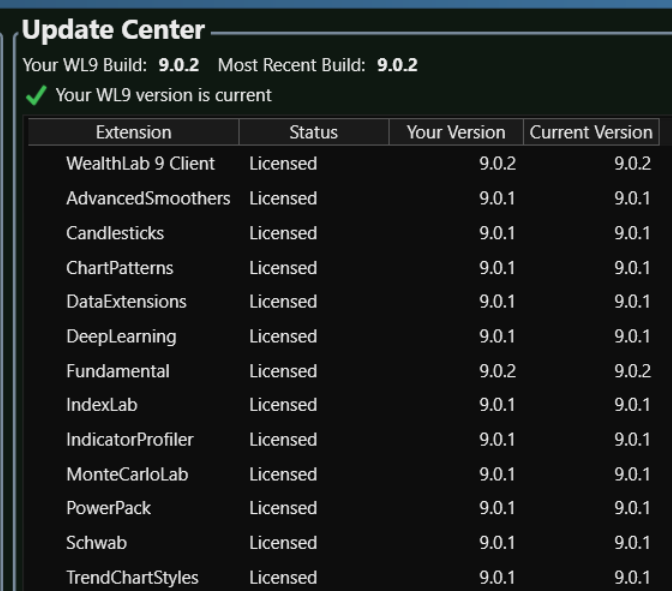
7. Run WL9
8. Go to Data Manager -> Event Providers and check some data providers like WealthData and Nasdaq. For my case, Zacks was already checked because that is what I had checked in WL8.
9. Exit WL9
10. Run WL9
11. Go to Data Manager -> Event Providers. Only Zacks is checked. WealthData and Nasdaq are not checked, but should be because they were selected in step 8.
The WL9 Settings.txt file has the correct selections:
The connections and exceptions log shows zero errors and zero entries for all of the above runs of WL9.
Btw... as a test, I uninstalled WL9, deleted its data folder, re-installed WL9 and did not do a migration, and did not install any extensions and the event provider selections worked properly.
Using WinMerge, I compared the WL8 settings.txt file to the WL9 settings.txt file (post migration), and although there were some seemingly minor differences here and there, nothing looked unusual, chopped-off, scrambled, or corrupted in the WL9 settings.txt file.
Deleting the post-migration WL9 settings. txt file and re-running WL9 and doing another migration did not fix the problem.
The same problem occurred for WL9 v 9.0.1.
2. Run WL9
3. Migrate version 8 settings
4. Exit
5. Run WL9
6. Install various extensions.
7. Run WL9
8. Go to Data Manager -> Event Providers and check some data providers like WealthData and Nasdaq. For my case, Zacks was already checked because that is what I had checked in WL8.
9. Exit WL9
10. Run WL9
11. Go to Data Manager -> Event Providers. Only Zacks is checked. WealthData and Nasdaq are not checked, but should be because they were selected in step 8.
The WL9 Settings.txt file has the correct selections:
CODE:
FundamentalsSelected=Nasdaq;WealthData;Zacks;
The connections and exceptions log shows zero errors and zero entries for all of the above runs of WL9.
Btw... as a test, I uninstalled WL9, deleted its data folder, re-installed WL9 and did not do a migration, and did not install any extensions and the event provider selections worked properly.
Using WinMerge, I compared the WL8 settings.txt file to the WL9 settings.txt file (post migration), and although there were some seemingly minor differences here and there, nothing looked unusual, chopped-off, scrambled, or corrupted in the WL9 settings.txt file.
Deleting the post-migration WL9 settings. txt file and re-running WL9 and doing another migration did not fix the problem.
The same problem occurred for WL9 v 9.0.1.
Rename
Just open the Data Manager, select which Event Providers you want, and they will remain selected the next time WL9 opens. I just went through the procedure and it worked fine. This should be a good workaround if the settings from the migration did not stick.
QUOTE:
Just open the Data Manager, select which Event Providers you want, and they will remain selected the next time WL9 opens. I just went through the procedure and it worked fine. This should be a good workaround if the settings from the migration did not stick.
I ran WL9.
I went to Data Manager -> Event Providers. I made sure that Nasdaq, WealthData and Zacks are checked.
I exited WL9.
I ran WL9.
I went to Data Manager -> Event Providers. Now, only Zacks is checked.
The above sequence is repeatable.
Settings.txt shows line with FundamentalsSelected=Nasdaq;WealthData;Zacks;
And, I can easily recreate the problem with WealthLab 8.
Also, I can uncheck Zacks, and check Nasdaq and WealthData, exit and restart and then only Zacks is checked (seems to love Zacks and nothing else). In this case, the settings.txt file shows the correct entries with FundamentalsSelected=Nasdaq;WealthData;
The error log is clear. Running in admin or non-admin mode makes no difference.
So, maybe there is some bad entry in my settings.txt file that is wreaking havoc. :) If you like, I can try deleting some settings.txt entries to see if one or more of them may be causing the issue.
Maybe. It could be an Event Provider that was in WL8 (finantic?) is not available yet in WL9. I’ll be sure to check this and add some defensive code for Build 3. I’ll report back the findings to confirm.
I'm not seeing an obvious issue in the code. Can you edit your Settings.txt file and remove the line starting with "FundamentalsSelected="?
Be sure to create a backup of the file first, then save it and start WL9. It should default to WealthData as the only selected Event Provider. And from that point forward it should save whichever Event Providers you select.
Be sure to create a backup of the file first, then save it and start WL9. It should default to WealthData as the only selected Event Provider. And from that point forward it should save whichever Event Providers you select.
QUOTE:
Maybe. It could be an Event Provider that was in WL8 (finantic?) is not available yet in WL9. I’ll be sure to check this and add some defensive code for Build 3. I’ll report back the findings to confirm.
I think the problem is my Default Workspace was saved with just Zacks checked.
So, to test this, I also checked Nasdaq, and WealthLab, and then picked "Save this as the Default Workspace". When I restarted WealthLab then the correct event providers were checked. So, I guess I was a bonehead in relation to workspaces. And, the way it works makes sense. So, I guess there is no issue, other than a dumb end-user.
Oh yeah, Workspaces WILL select/de-select providers, good we figured it out :)
Your Response
Post
Edit Post
Login is required