Only these are showing:
-Positions
-Monthly Returns
-Metrics Report.
- Correlations.
built-in Performance Visualizers should be these:
- [Metrics Report](MetricsReport)
- [Equity Curve](Equity%20Curve)
- [Drawdown Curve](Drawdown%20Curve)
- [Distributions](Distributions)
- [Positions](Positions)
- [Periodic Returns](Periodic%20Returns)
- [Monthly Returns](Monthly%20Returns)
- [Rolling Profit](Rolling%20Profit)
- [By Symbol](By%20Symbol)
-Positions
-Monthly Returns
-Metrics Report.
- Correlations.
built-in Performance Visualizers should be these:
- [Metrics Report](MetricsReport)
- [Equity Curve](Equity%20Curve)
- [Drawdown Curve](Drawdown%20Curve)
- [Distributions](Distributions)
- [Positions](Positions)
- [Periodic Returns](Periodic%20Returns)
- [Monthly Returns](Monthly%20Returns)
- [Rolling Profit](Rolling%20Profit)
- [By Symbol](By%20Symbol)
Rename
Just check the ones you want to see in Preferences > Backtest > Performance Visualizers.
Then, open the Strategy and run a new backtest.
Then, open the Strategy and run a new backtest.
There are missing from Preferences > Backtest > Performance Visualizers. So there is no way to select them.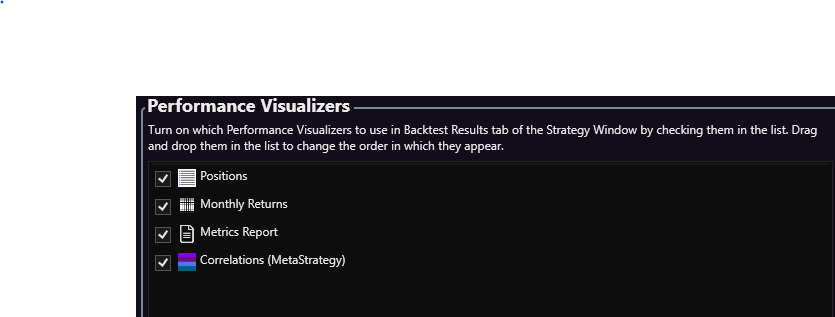
Notably the visualizers using Teechart graphs are missing. Are there any messages in the WL9 Log Viewer (View/Log) and did you copy any other extensions or anything else manually into the WL9 program files folder?
Fixed by these steps:
Removed WL9.
Deleted all leftover files.
And installed it again.
Then re-compiled my VS 2026 dlls.
Removed WL9.
Deleted all leftover files.
And installed it again.
Then re-compiled my VS 2026 dlls.
Your Response
Post
Edit Post
Login is required