Okay, thanks for the heads up. Meanwhile, you can work on this to prepare for the installation - that is, if you want all the contiguous history and for the provider to keep it up-to-date.
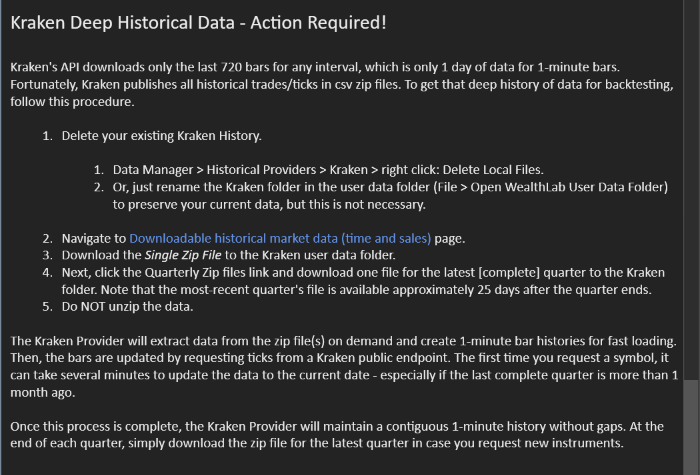
Kraken just updated the page this week, so follow instructions there to get the Complete Data and assemble it into one Zip file. Here's the link:
https://support.kraken.com/articles/360047543791-downloadable-historical-market-data-time-and-sales-
Kraken just updated the page this week, so follow instructions there to get the Complete Data and assemble it into one Zip file. Here's the link:
https://support.kraken.com/articles/360047543791-downloadable-historical-market-data-time-and-sales-
Try Kraken now
And, if you did the migration, delete all your Kraken data history before you start with the "Kraken Deep History" in WL9.
Data Manager > Historical Providers > Kraken > right click > Delete Local Files.
Data Manager > Historical Providers > Kraken > right click > Delete Local Files.
The download is working. It installed fine. The data setup is quite a bit different from WL8 and WL9 Kraken is not returning Forex Symbol quotes. So I will hold off transitioning for now as I don't have time to debug it. Thanks for looking into it. Very much appreciated.
Which forex symbol(s) didn't work?
The first time you ask for a symbol, A LOT, of processing is done to return the full history of all trades on the Kraken netork. This is a one-time thing so that all history is available instead of the little bit that Kraken will return.
In this image, it's on the 167 request for time of sales (showing the date of the last request). since the end of the data I had in my zip files. If there are many trades, this can take dozens of minutes to process one symbol - the first time only.
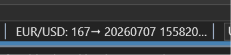
.. and Kraken allows only someting like 6 requests per minute - that's why it's so slow.
The first time you ask for a symbol, A LOT, of processing is done to return the full history of all trades on the Kraken netork. This is a one-time thing so that all history is available instead of the little bit that Kraken will return.
In this image, it's on the 167 request for time of sales (showing the date of the last request). since the end of the data I had in my zip files. If there are many trades, this can take dozens of minutes to process one symbol - the first time only.
.. and Kraken allows only someting like 6 requests per minute - that's why it's so slow.
Your Response
Post
Edit Post
Login is required