I was trying to update to current WealthLab version from a version installed last year so there might be dependencies issues. The install is stuck on the 8.0.1 x64 windows desktop runtime install. The windows desktop runtime iinstall says successful but if I select the close button on the windows desktop runtime install window the main install window for wealthlab opens a cancellation confirmation dialog. Any ideas? The install in the image has been going for 12 hrs. 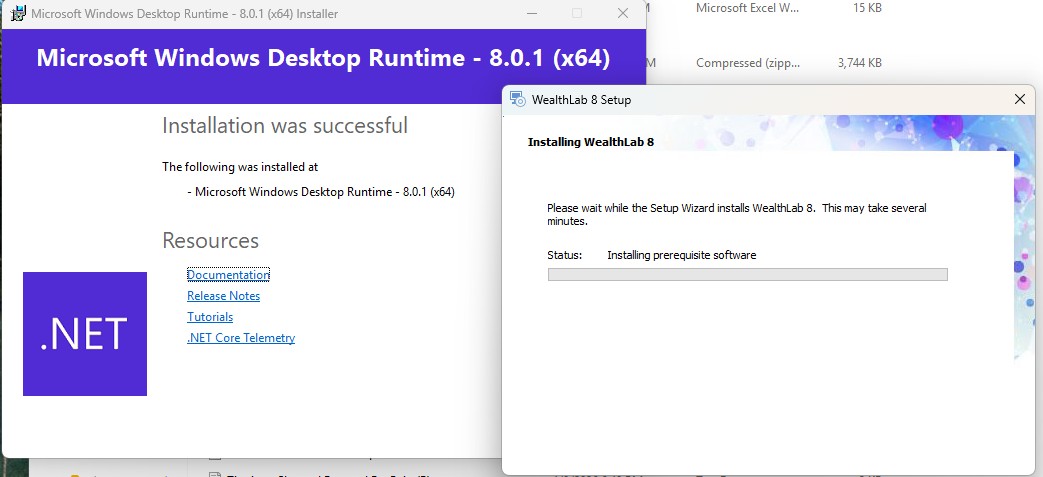
Rename
Did you try and run the full setup or the "Lite" setup? The Lite setup does not include the .NET pre-requisite. We've had one other customer report this issue but can't reproduce it locally. It happened after we updated the version of the installer software we use (Advanced Installer.) I'm reaching out to them for help on this.
https://www.advancedinstaller.com/forums/viewtopic.php?t=53733
https://www.advancedinstaller.com/forums/viewtopic.php?t=53733
I've tried the lite install, the full install, and also installing windows desktop runtime 8.0.1 x64 directly from microsoft download. None of these worked.
Thanks for the additional info, I amended my post on the Advanced Installer forum to reflect this. If you're looking only to update WL8 to a more recent build I can provide you a download link for the EXE alone, if you copy it into the WL8 install folder it should work fine. Just send me an email to support@wealth-lab.com if you want to give this a try.
Thanks Glitch, I sent an email requesting the exe,
Your Response
Post
Edit Post
Login is required