Currently my default C# template is saved pointing to an empty dataset. This condition causes a new strategy to hang when based on such a template.
So the obvious solution is to save a new C# default template with SPY as the stock to evaluate. But to the life of me, whenever I try to set SPY as the stock, the Edit menu grays out so I can't set it as a default.
So how can I prevent the Edit menu from graying out when I set SPY--or any stock--as my stock for my "potential" default C# template? And what's causing the Edit menu to gray out in the first place when formulating the template?
I'm running WL8 Build 173.
So the obvious solution is to save a new C# default template with SPY as the stock to evaluate. But to the life of me, whenever I try to set SPY as the stock, the Edit menu grays out so I can't set it as a default.
So how can I prevent the Edit menu from graying out when I set SPY--or any stock--as my stock for my "potential" default C# template? And what's causing the Edit menu to gray out in the first place when formulating the template?
I'm running WL8 Build 173.
Rename
The code template is code only, separate from the default Strategy Settings.
To save default Strategy Settings, just open a Strategy Window, configure the settings, then click Save as Default for New Strategies in the lower left corner.
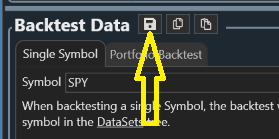
In WL9 that "Save as Default" button was minimized here:
To save default Strategy Settings, just open a Strategy Window, configure the settings, then click Save as Default for New Strategies in the lower left corner.
In WL9 that "Save as Default" button was minimized here:
Your Response
Post
Edit Post
Login is required