I have a question that I haven't been able to find an answer to, even after searching extensively in this forum.
I'm building a simple rotation strategy:
1. I'm buying the five Nasdaq 100 symbols with the lowest RSI (3) values. I rotate daily, so that's the entry point.
2. Exit: I only want to sell the symbol I bought when it's no longer among the five Nasdaq 100 symbols with the lowest RSI. This would essentially be a ranking exit strategy. Is there something like this in Wealth-Lab?
I've searched for "Symbol is Ranked Below" or "Position is no longer in Top," but unfortunately, I can't find anything.
Thanks!
I'm building a simple rotation strategy:
1. I'm buying the five Nasdaq 100 symbols with the lowest RSI (3) values. I rotate daily, so that's the entry point.
2. Exit: I only want to sell the symbol I bought when it's no longer among the five Nasdaq 100 symbols with the lowest RSI. This would essentially be a ranking exit strategy. Is there something like this in Wealth-Lab?
I've searched for "Symbol is Ranked Below" or "Position is no longer in Top," but unfortunately, I can't find anything.
Thanks!
Rename
Our built on Rotation Strategy type will do exactly that. Set the Weight indicator to lowest RSI, set number of symbols to 5, and run it on the Nasdaq 100. You’ll get exactly the behavior you described.
In short, create a new Rotation Strategy type, not a Building Block or C# one.
In short, create a new Rotation Strategy type, not a Building Block or C# one.
Mathematically, that's a perfectly correct answer.
However, if I only want to sell the symbol I bought at entry when it's no longer among, say, the 30% lowest-ranked, that doesn't help me either. Is there a way to achieve this? Ideally, I'd also like to optimize this percentage value.
Symbol is Ranked Below <30% or "Position is no longer in Top 70%"
Thanks
However, if I only want to sell the symbol I bought at entry when it's no longer among, say, the 30% lowest-ranked, that doesn't help me either. Is there a way to achieve this? Ideally, I'd also like to optimize this percentage value.
Symbol is Ranked Below <30% or "Position is no longer in Top 70%"
Thanks
For something more complex like that it would gave to be coded in C#, I’ll whip up an example tomorrow.
My bad, you can easily create this in Blocks.
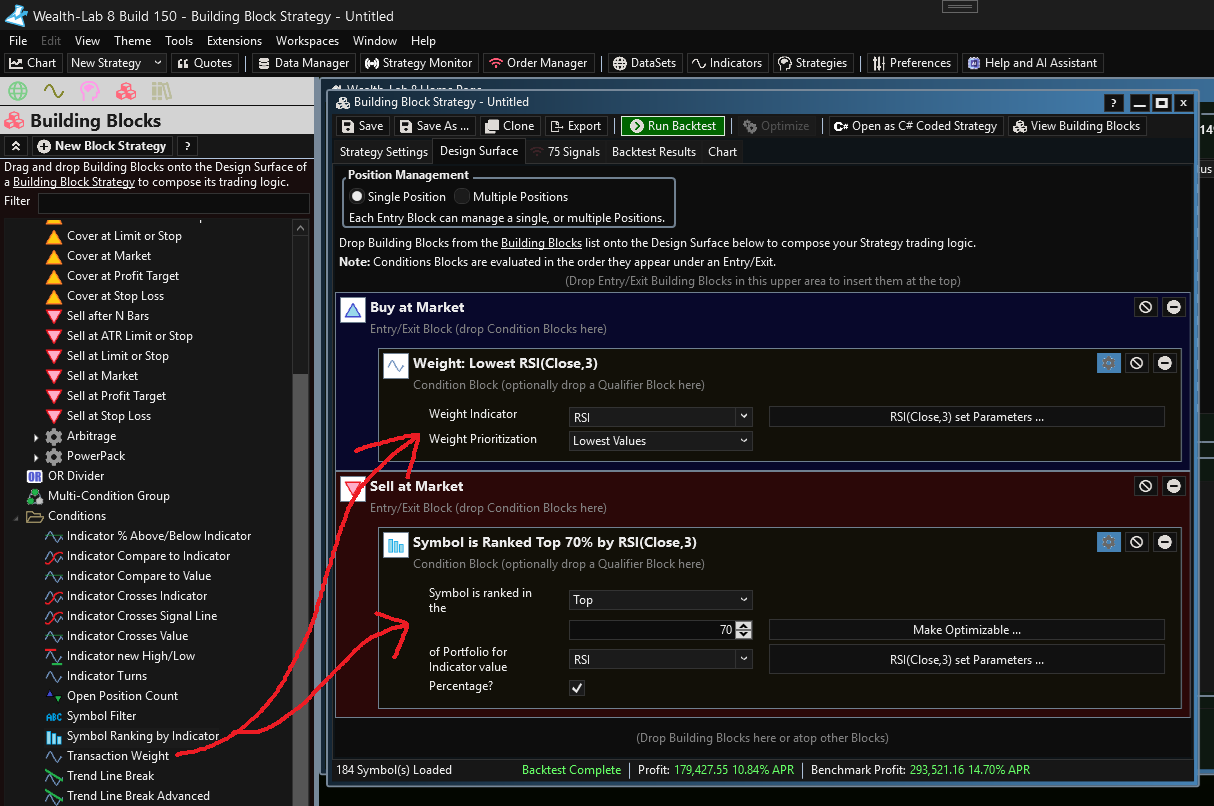
So you always want to be in a position, correct? Use Blocks, use RSI(3) as the Weight Condition indicator. Set position size of 20% and Max Open Positions to 5. That will buy you the 5 stocks with the lowest RSI(3).
And you want to only sell the stock with it is no longer in the bottom 30% ranked by RSI(3)? Use the Symbol Ranking Condition on the exit block.
Example:
So you always want to be in a position, correct? Use Blocks, use RSI(3) as the Weight Condition indicator. Set position size of 20% and Max Open Positions to 5. That will buy you the 5 stocks with the lowest RSI(3).
And you want to only sell the stock with it is no longer in the bottom 30% ranked by RSI(3)? Use the Symbol Ranking Condition on the exit block.
Example:
Thank you for the informative reply:
Unfortunately, it's still not working as expected. I'll use your example from the screenshot to explain what's not working.
In your example, 5 positions were purchased on date X. A sale occurs when the value is no longer among the top 30 of the RSI(3). Let's assume that on day Y, one of the previously purchased top 5 positions is sold. This would create space for a new position. As I understand it, the value that should now be purchased is the one with the lowest RSI(3) value on day Y. The 4 remaining securities from the first purchase should, of course, be excluded and not included in the calculation.
This is precisely where something isn't working. During this purchase, I found several securities that had a lower RSI(3) value on the second purchase date than the symbol that was subsequently purchased in the backtest. I also tried it with other indicators, and errors occur there as well. Do you have any idea what the cause might be, or am I misunderstanding something?
P.S.
Is it actually possible to display the purchase volume (quantity * price) in the position metrics after backtesting?
Unfortunately, it's still not working as expected. I'll use your example from the screenshot to explain what's not working.
In your example, 5 positions were purchased on date X. A sale occurs when the value is no longer among the top 30 of the RSI(3). Let's assume that on day Y, one of the previously purchased top 5 positions is sold. This would create space for a new position. As I understand it, the value that should now be purchased is the one with the lowest RSI(3) value on day Y. The 4 remaining securities from the first purchase should, of course, be excluded and not included in the calculation.
This is precisely where something isn't working. During this purchase, I found several securities that had a lower RSI(3) value on the second purchase date than the symbol that was subsequently purchased in the backtest. I also tried it with other indicators, and errors occur there as well. Do you have any idea what the cause might be, or am I misunderstanding something?
P.S.
Is it actually possible to display the purchase volume (quantity * price) in the position metrics after backtesting?
I overlooked something important here, apologies.
You'll need to turn off "Retain NSF Positions" in the Strategy Settings for it to work properly. We're relying on always having the unbought candidates available for purchase, and if we let WL keep the NSF positions in the background we wind up having those lingering and not being able to be bought again when the time is right.
Typically I like keeping this setting on to preserve the backtest logic integrity, but in this case it relies on it being off.
You'll need to turn off "Retain NSF Positions" in the Strategy Settings for it to work properly. We're relying on always having the unbought candidates available for purchase, and if we let WL keep the NSF positions in the background we wind up having those lingering and not being able to be bought again when the time is right.
Typically I like keeping this setting on to preserve the backtest logic integrity, but in this case it relies on it being off.
And sure, Ill add that Purchase Volume to the Position Metrics for next build.
ich danke Ihnen
If you're coding in C#, you can create your own custom Position Metrics yourself using the SetPositionMetric method as shown below. This gives you unlimited capability to create your own metrics for modeling. This can't be done with Blocks.
I haven't tested the code below, so do correct any of my mistakes.
I haven't tested the code below, so do correct any of my mistakes.
CODE:The real reason to add your own Position Metric to the Transaction (or Position) object is so it shows up in the Position Metrics and Analysis Series performance visualizer by default; otherwise, you probably don't need to do this.
public override void Execute(BarHistory bars, int idx) { if (HasOpenPosition(bars, PositionType.Long)) { //sell conditions below } else { //buy conditions below if (...) { Transaction tran = PlaceTrade(bars, TransactionType.Buy, OrderType.Market, 0.0); tran.SetPositionMetric("PurchaseVolume", tran.Quantity*tran.ExecutionPrice); } } }
Your Response
Post
Edit Post
Login is required