It’s still bothering me. I really want to trade the breakout system on URNM. Since I live in Germany, I’m using the CFD for the symbol URNM. However, the executions are incredibly poor and slow. Now I’m trying the following: I’ve set the time frame to 2 days, which only slightly reduces the performance. I still have an APR of 113%. I manually wait for the price to exceed 0.5%, and then I place a limit order. I'm curious to see if this will work. Unfortunately, I can’t always execute this manually, so I’ll likely miss some entries.
Rename
I was also thinking that using a CFD would be a high leverage option. However, the risk is slippage and big bid/ask spreads. Before trading in realtime make sure you run it with real data on a demo account.
One improvement would be to replace the STP order by a Stop Limit Order, so that on a CFD the price would not be different or having a huge slippage than what was expected in the strategy. I guess I have to do this manually in TWS on my broker Interactive Broker. By the way: We have now an APR of +142% on the URNM breakout strategy. It "just" a lot of manual work to get it run.
WealthLab supports OrderType.StopLImit. Search the QuickRef for StopLimit.
Hi i cant get the ORBS to run automatically as in to enter exit by its self - i have to manually place the trade.
I live in Norway. Is this the reason?
I live in Norway. Is this the reason?
A. F1 - use the User Guide. You can even ask the A.I. Assistant there.
Option 1 -
Drag the Strategy into a Streaming Chart, set up broker/account/sizing, set Auto-Place.
Option 2 -
Drag the Strategy into the Strategy Monitor, set up scale, sizing, broker/account, set Auto-Place.
Option 1 -
Drag the Strategy into a Streaming Chart, set up broker/account/sizing, set Auto-Place.
Option 2 -
Drag the Strategy into the Strategy Monitor, set up scale, sizing, broker/account, set Auto-Place.
Hello again @Cone
I have it up and running now,. The Open Range Break Out Strategy that is shown in this video.... https://www.youtube.com/watch?v=m5iuKWsvmUY
I want to know how to configure, do I run this on daily time frame set at 0945? Or 15 mins?
Tried the AI assistant, very good but I didnt the answer I was looking for.
Thanks
I have it up and running now,. The Open Range Break Out Strategy that is shown in this video.... https://www.youtube.com/watch?v=m5iuKWsvmUY
I want to know how to configure, do I run this on daily time frame set at 0945? Or 15 mins?
Tried the AI assistant, very good but I didnt the answer I was looking for.
Thanks
You can just set that up to run in the Strategy Monitor, Daily, at 093000 Market Time, then Activate and enable Auto Place.
However, I'd caution against using that strategy with URNM the way it's coded in the building blocks due to the use of Stop orders. I don't follow URNM, but a 1-minute chart indicates that it's a thinly traded stock, so slippage could be quite significant when using Stop orders.
I'd check the spreads near the open and probably rewrite it to use a StopLimit order.
However, I'd caution against using that strategy with URNM the way it's coded in the building blocks due to the use of Stop orders. I don't follow URNM, but a 1-minute chart indicates that it's a thinly traded stock, so slippage could be quite significant when using Stop orders.
I'd check the spreads near the open and probably rewrite it to use a StopLimit order.
I wasn't watching it at the open, but here's what I mean...
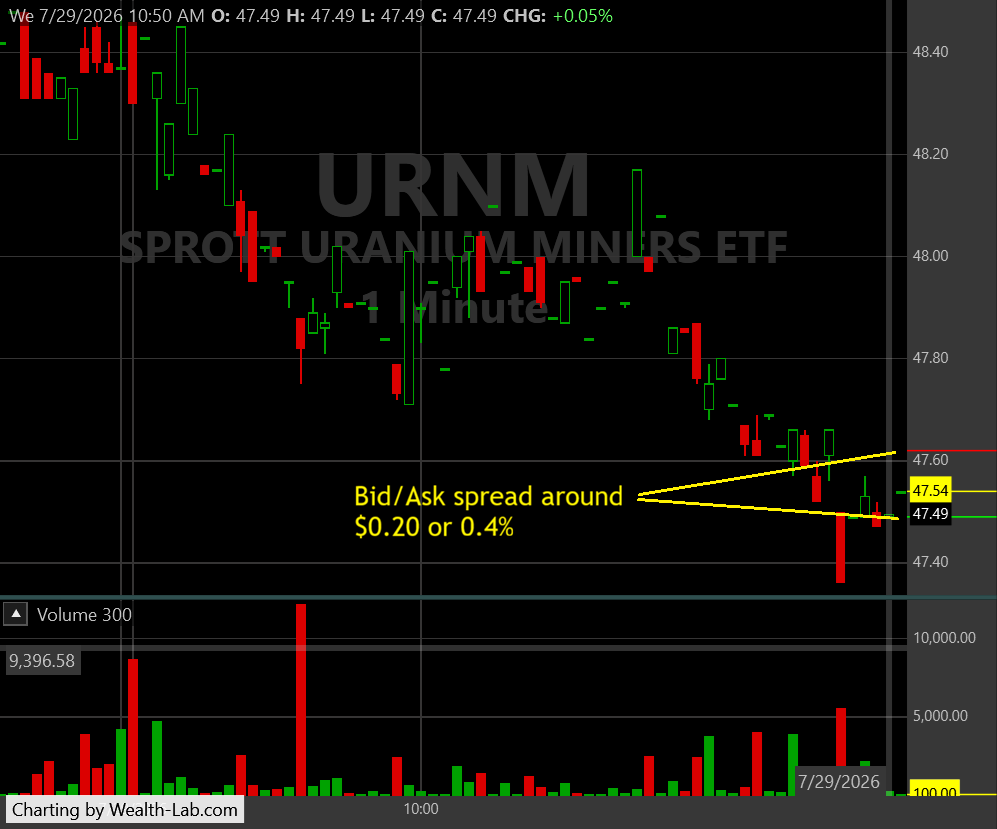
The spread seems to be pretty consistently around 0.4% of the current price. Since a Stop order executes at Market, you'll likely get the far-end of the spread, not the actual price of the Stop like the backtest. (Avg Profit % in the backtest is just over 0.8%, so 0.4% would eat half your profit on just one side of the trade.)
A possible solution for live trading is to use a StopLimit order with the StopLimitLimitPrice (that's the field in WL's Transaction) at or near the Stop price. The disadvantage is the likelihood of missing some orders altogether in a fast-moving market.
The spread seems to be pretty consistently around 0.4% of the current price. Since a Stop order executes at Market, you'll likely get the far-end of the spread, not the actual price of the Stop like the backtest. (Avg Profit % in the backtest is just over 0.8%, so 0.4% would eat half your profit on just one side of the trade.)
A possible solution for live trading is to use a StopLimit order with the StopLimitLimitPrice (that's the field in WL's Transaction) at or near the Stop price. The disadvantage is the likelihood of missing some orders altogether in a fast-moving market.
Your Response
Post
Edit Post
Login is required