Good evening, I probably have a somewhat unusual question regarding the use of Wealth-Lab, but I'll try anyway, sorry in advance.
When I apply a single strategy, I specify the ticker symbol QQQ as an example, set the position size to 100% equity, and the margin to approximately 1.1. So far, so good.
Now, if I want to test all the individual symbols of the Nasdaq 100 for this strategy, I actually have to run the backtest with each symbol individually, meaning 100 runs where I have to enter each symbol in the settings.
Is that correct, or is there a faster way to do this?
Thanks in advance.
When I apply a single strategy, I specify the ticker symbol QQQ as an example, set the position size to 100% equity, and the margin to approximately 1.1. So far, so good.
Now, if I want to test all the individual symbols of the Nasdaq 100 for this strategy, I actually have to run the backtest with each symbol individually, meaning 100 runs where I have to enter each symbol in the settings.
Is that correct, or is there a faster way to do this?
Thanks in advance.
Rename
The Strategy Rankings tool can do this. Use the second tab, Symbol Rankings, and check the box "Use 100% sizing." If you want to explore any run in more detail, double click it to open it in a Strategy window.
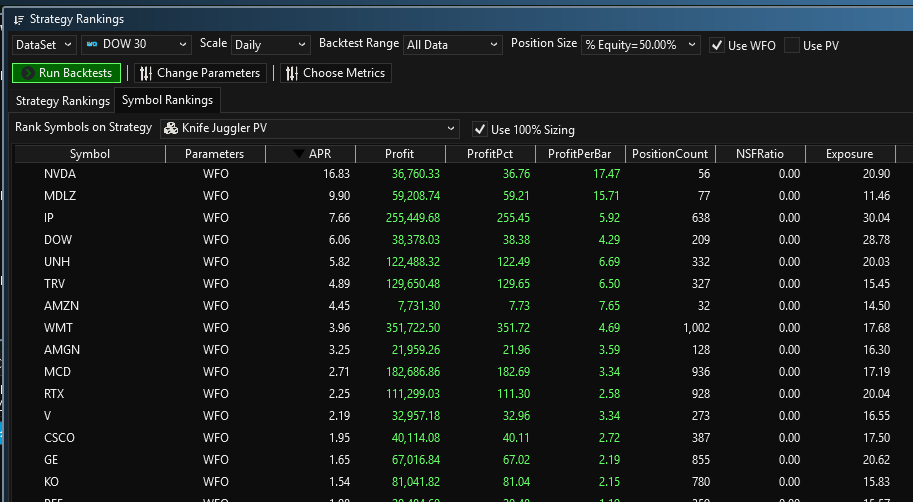
Thank you for your reply.
Does it matter what value I enter for Position Size?
Does it matter what value I enter for Position Size?
If you check the box that says “Use 100%” then it does not. It’s an override for that tab.
I still have a question about this approach
Is it correct that I can optimize each symbol individually or is there a way to optimize all symbols at once?
thanks in advance
Is it correct that I can optimize each symbol individually or is there a way to optimize all symbols at once?
thanks in advance
You can optimize either way. When you optimize a Strategy you can do a basic optimization or a Symbol by Symbol optimization.
Thanks for the quick reply.
What I mean is, can I optimize all the symbols in a dataset together in the Strategy Rankings tool after they've been loaded? I don't see how that's possible within the Strategy Rankings tool.
What I mean is, can I optimize all the symbols in a dataset together in the Strategy Rankings tool after they've been loaded? I don't see how that's possible within the Strategy Rankings tool.
QUOTE:
can I optimize all the symbols in a dataset together in the Strategy Rankings tool
The Strategy Rankings tool is not for parameter optimization. To do parameter optimization, you must use the Strategy window and select the Optimization button. From that tab, you can select which optimizer you want to use and the configuration for that particular parameter optimizer.
So, double-click on the desired icon and then optimize individually?
Which desired icon? Exactly what are you trying to optimize?
As mentioned in Post #5, you can parameter optimize an entire dataset one symbol at a time employing Symbol-by-Symbol optimization. I suggest you read the chapter of the Help docs on optimization so you get the bigger picture because there are many choices.
As mentioned in Post #5, you can parameter optimize an entire dataset one symbol at a time employing Symbol-by-Symbol optimization. I suggest you read the chapter of the Help docs on optimization so you get the bigger picture because there are many choices.
Your Response
Post
Edit Post
Login is required