I am brand new to WL and trading like this and I've just tried to follow one of the intro videos showing how to create strategies with AI. I've tried twice: the first time it crashed the application well enough that ctrl-alt-del wouldnt even work and I had to restart, the second time it thought for a while and then said "One or more errors occurred. A task was canceled." Both times it consumed a "wealthbit". I'm wondering if I am doing something wrong, or if this is a new tool where we should expect weirdness to occur for some time, or if it is super sensitive to text/typos/etc, or if there is a way forward I'm missing. Below is the text that I gave it the second time.
Any insights appreciated!
Trading Universe: all stocks in the S&P500
Liquidity filter: Trade only the stock that are currently in the top 25 percent of the highest average volume over the last 20 days.
Entry: Get into a stock if the following are all true: close of the S&P 500 index is above the 200 day SMA and the close of the stock is higher than 200 trading days ago.
Ranking: Keep 10 open open positions. If we have more than 10 candidate stocks to trade, we give preference to the stocks with the highest relative strength over the last 200 trading days. Buy the next day at market price on open.
Exit rules: Once we are in a position, the next day we place a stop loss of 7% below the closing price. If the position is profitable, we use a trailing stop of 25%. If either stop is triggered, we exit the next day on the open price.
Any insights appreciated!
Trading Universe: all stocks in the S&P500
Liquidity filter: Trade only the stock that are currently in the top 25 percent of the highest average volume over the last 20 days.
Entry: Get into a stock if the following are all true: close of the S&P 500 index is above the 200 day SMA and the close of the stock is higher than 200 trading days ago.
Ranking: Keep 10 open open positions. If we have more than 10 candidate stocks to trade, we give preference to the stocks with the highest relative strength over the last 200 trading days. Buy the next day at market price on open.
Exit rules: Once we are in a position, the next day we place a stop loss of 7% below the closing price. If the position is profitable, we use a trailing stop of 25%. If either stop is triggered, we exit the next day on the open price.
Rename
QUOTE:
I've ... tried ... to create strategies with AI. I've tried twice: the first time it crashed the application well enough that ctrl-alt-del wouldn't even work and I had to restart, the second time it ... said "One or more errors occurred."
I'm not so sure AI is ready for real stock trading today. But it will improve as it learns over time.
Right now, I would start with example strategies--by real humans--that work until you are ready to debug any solutions that AI provides you.
Also, all strategies have pitfalls. I would cherry pick only those stocks that have a recent proven track record with a particular strategy and only include those in your trading datasets. And remember, any track record is temporary for any particular stock. I reevaluate my cherry picks every weekend with the Symbol Ranking tab of the WL Strategy Ranking tool; see the New Strategy Rankings Window of the Tools menu.
Cherry picks for ETFs are more permanent. I'm not sure why. But there's very little turnover in my cherry picked ETF datasets.
It is a new feature for WL9, but it certainly shouldn't crash. If you have more details about how to create crashes like this (especially WealthLab9.exe details from the Application log of the Windows Events Viewer) please pass them on to info@wealth-lab.com.
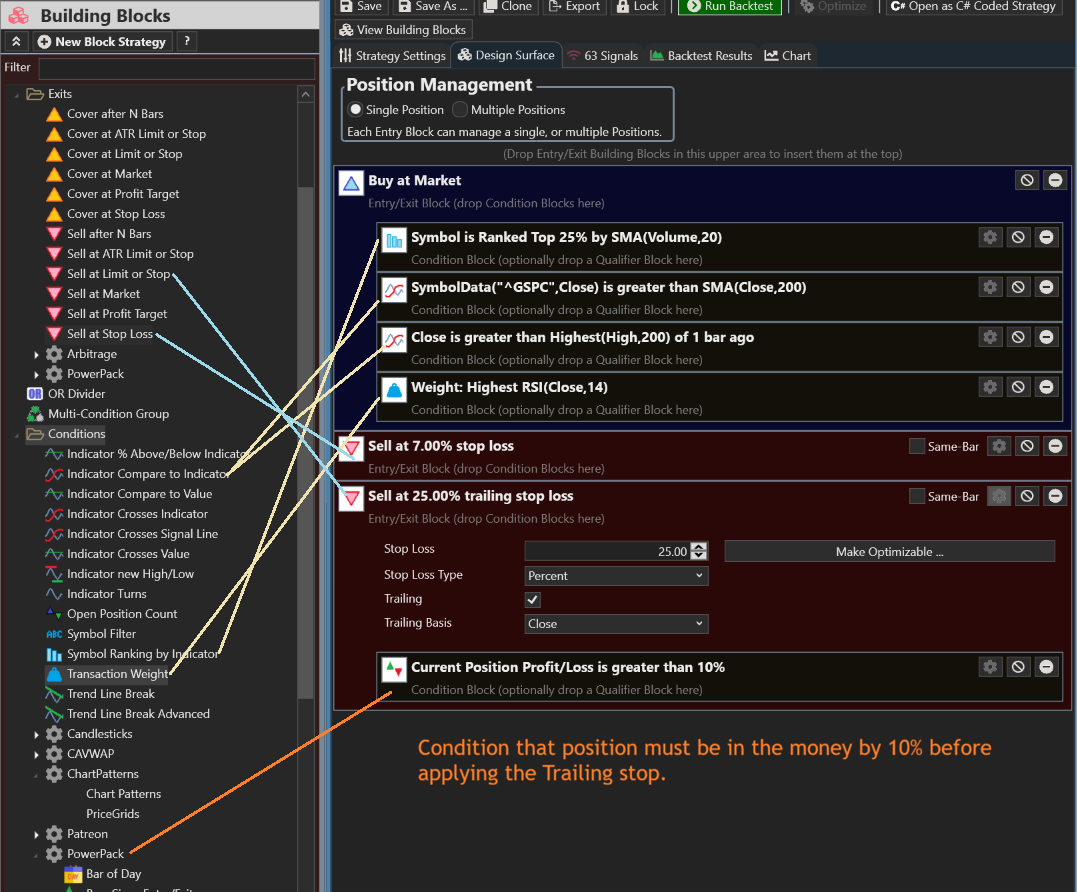
Meanwhile, using Building Blocks I think this is a pretty good representation of the Strategy rules. It wasn't clear how you wanted to measure Relative Strength, so I just used RSI. TransactionWeight is what controls the priority of signals when there are many candidates.
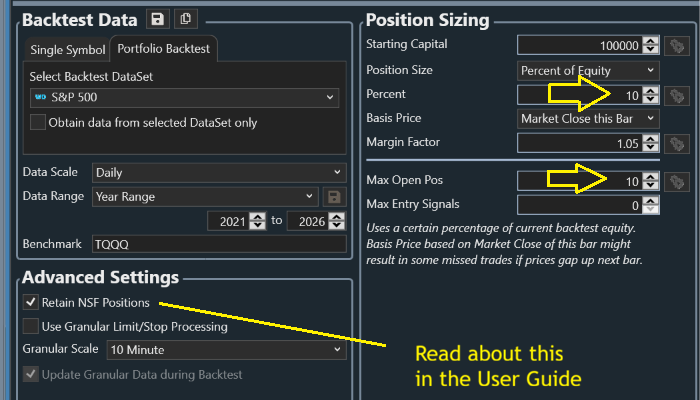
Set up the sizing and max positions in Strategy Settings. 10% sizing with a bit of margin (to account for gaps) will keep you at 10 positions, but the Max Positions setting will also work if sizing is less such that Buying Power could put on more than 10 positions. Finally, Retain NSF positions will make a big difference in a strategy like this one.
Meanwhile, using Building Blocks I think this is a pretty good representation of the Strategy rules. It wasn't clear how you wanted to measure Relative Strength, so I just used RSI. TransactionWeight is what controls the priority of signals when there are many candidates.
Set up the sizing and max positions in Strategy Settings. 10% sizing with a bit of margin (to account for gaps) will keep you at 10 positions, but the Max Positions setting will also work if sizing is less such that Buying Power could put on more than 10 positions. Finally, Retain NSF positions will make a big difference in a strategy like this one.
Hmm, you might have hit a point where the service was experiencing a back end issue, not sure. I tried your prompt and it generated valid code, but I did have to send it through twice, it had a couple of error the first attempt. I asked the AI to correct the errors and the second pass was a success. I did need to manually change the "market" symbol it chose from "^SPX" to "SPY" but otherwise it worked.
But you should also try connecting WL9 to Claude Code via the MCP integration. Claude can design a strategy, iterate, and run backtests in WealthLab. The latest Claude Code models are more powerful than the fine tuned model used in the Strategy AI window.
But you should also try connecting WL9 to Claude Code via the MCP integration. Claude can design a strategy, iterate, and run backtests in WealthLab. The latest Claude Code models are more powerful than the fine tuned model used in the Strategy AI window.
Your Response
Post
Edit Post
Login is required