Data provider: Interactive Brokers
WL9 build 5, IB build 9.0.3
Scale: 30 Second, regular session only (Filter Pre/Post enabled)
Symbol tested: SNDK
Problem
On the 30-second scale, WL9 leaves whole blocks of a session missing and never re-requests them. The gaps are not missing trades — they're contiguous blocks that start mid-session and run to the close, which looks like the historical request stopping early and not being retried.
Loaded 30-second history: 12/4/2025 → 8/24/2026, 135,074 bars over 179 sessions.
In the 26 most recent sessions, six are truncated:
┌───────────┬─────────────────┬─────────────────┐
│ session │ last 30-sec bar │ minutes missing │
├───────────┼─────────────────┼─────────────────┤
│ 7/21/2026 │ 12:28 │ 213 │
├───────────┼─────────────────┼─────────────────┤
│ 7/28/2026 │ 14:46 │ 75 │
├───────────┼─────────────────┼─────────────────┤
│ 8/03/2026 │ 09:35 │ 386 │
├───────────┼─────────────────┼─────────────────┤
│ 8/10/2026 │ 10:15 │ 346 │
├───────────┼─────────────────┼─────────────────┤
│ 8/11/2026 │ 12:28 │ 213 │
├───────────┼─────────────────┼─────────────────┤
│ 8/17/2026 │ 09:42 │ 379 │
└───────────┴─────────────────┴─────────────────┘
Across the full overlap window, 2,002 minutes are absent from the 30-second data.
These are not missing trades
The same symbol at 1-minute scale has complete 390-bar coverage (09:31–16:00) on every one of those six days — so trades were printing throughout each session. Only the 30-second request is coming up short. The 1-minute scale shows no truncated sessions at all in that window; its only gaps are isolated single minutes and legitimate half-day closes.
Impact
Any indicator with a bar-count period silently spans the wrong amount of wall-clock time on the 30-second scale. A 21-session Gaussian filter reads 1513 on the 30-second chart vs 1571 on the 1-, 5- and 30-minute charts of the same symbol — the missing afternoons include the session highs, so the error is one-directional, not noise.
After realizing that there are gaps, I manually deleted the 30 sec QX file, restarted WL, re-ran the strategy code complie (not the chart), which forced a clean, gapless data.
WL9 build 5, IB build 9.0.3
Scale: 30 Second, regular session only (Filter Pre/Post enabled)
Symbol tested: SNDK
Problem
On the 30-second scale, WL9 leaves whole blocks of a session missing and never re-requests them. The gaps are not missing trades — they're contiguous blocks that start mid-session and run to the close, which looks like the historical request stopping early and not being retried.
Loaded 30-second history: 12/4/2025 → 8/24/2026, 135,074 bars over 179 sessions.
In the 26 most recent sessions, six are truncated:
┌───────────┬─────────────────┬─────────────────┐
│ session │ last 30-sec bar │ minutes missing │
├───────────┼─────────────────┼─────────────────┤
│ 7/21/2026 │ 12:28 │ 213 │
├───────────┼─────────────────┼─────────────────┤
│ 7/28/2026 │ 14:46 │ 75 │
├───────────┼─────────────────┼─────────────────┤
│ 8/03/2026 │ 09:35 │ 386 │
├───────────┼─────────────────┼─────────────────┤
│ 8/10/2026 │ 10:15 │ 346 │
├───────────┼─────────────────┼─────────────────┤
│ 8/11/2026 │ 12:28 │ 213 │
├───────────┼─────────────────┼─────────────────┤
│ 8/17/2026 │ 09:42 │ 379 │
└───────────┴─────────────────┴─────────────────┘
Across the full overlap window, 2,002 minutes are absent from the 30-second data.
These are not missing trades
The same symbol at 1-minute scale has complete 390-bar coverage (09:31–16:00) on every one of those six days — so trades were printing throughout each session. Only the 30-second request is coming up short. The 1-minute scale shows no truncated sessions at all in that window; its only gaps are isolated single minutes and legitimate half-day closes.
Impact
Any indicator with a bar-count period silently spans the wrong amount of wall-clock time on the 30-second scale. A 21-session Gaussian filter reads 1513 on the 30-second chart vs 1571 on the 1-, 5- and 30-minute charts of the same symbol — the missing afternoons include the session highs, so the error is one-directional, not noise.
After realizing that there are gaps, I manually deleted the 30 sec QX file, restarted WL, re-ran the strategy code complie (not the chart), which forced a clean, gapless data.
Rename
Darn, I thought you were going to tell me how much you like the quick connection to TWS with IB build 9.0.3. :/
I'll take a look at the 30 second thing.
I'll take a look at the 30 second thing.
Sorry :(
Just edited initial ticket above - note the fix at the end.
Thanks!
Just edited initial ticket above - note the fix at the end.
Thanks!
I didn't see an issue either and just came back to post my QX file.
https://drive.google.com/file/d/1QTb4QOc0GfkMNbyqfVJtjOhGhj6m1LJF/view?usp=sharing
The updates are in batches, but if somehow you missed a batch you'd see a gap of several days, not just several bars. Keep an eye on it!
https://drive.google.com/file/d/1QTb4QOc0GfkMNbyqfVJtjOhGhj6m1LJF/view?usp=sharing
The updates are in batches, but if somehow you missed a batch you'd see a gap of several days, not just several bars. Keep an eye on it!
If you ran, like me, from scratch - then, yes, it will create a nice, gappless data. However, like I detailed above, over time, it will start missing data and won't know to refill automaticly. I had to delete the stale data file and run a brand new one.
Please note that I'm seeing it only in 30-seconds. 1 minute is fine.
Please note that I'm seeing it only in 30-seconds. 1 minute is fine.
Okay, will look for it.
Meanwhile, if it happens again, use the Data Tool to truncate bars at a convenient spot, like a Saturday before the error and then update again.
Meanwhile, if it happens again, use the Data Tool to truncate bars at a convenient spot, like a Saturday before the error and then update again.
I'm not used to looking at sub-1m charts, but I'm seeing a bad effect with Streaming - the bars are closing every 30 seconds, but relative to the second you started the Stream.
For example, if you start at 09:30:07, the 30 second bars will update at every :37 and :07 second of the minute interval thereafter.
That isn't an IB issue - it's a WL bug in the StreamingBarBuilder.
With IB there's always some variation with the bars build from streaming due to conflated data, but to get data in the same ballpark with sub-1min intervals, make sure to click "Stream" about 1 second before the clock ticks :00 or :30.
For example, if you start at 09:30:07, the 30 second bars will update at every :37 and :07 second of the minute interval thereafter.
That isn't an IB issue - it's a WL bug in the StreamingBarBuilder.
With IB there's always some variation with the bars build from streaming due to conflated data, but to get data in the same ballpark with sub-1min intervals, make sure to click "Stream" about 1 second before the clock ticks :00 or :30.
This "cutoff" issue is fixed for WL9 Build 6.
build 906 still missing 30 seconds bars. No matter what I do to force it to update.
In the screenshot, 30-sec data is up-to-date but a simple 30 sec chart cuts off yesterday at 12:07 pm.
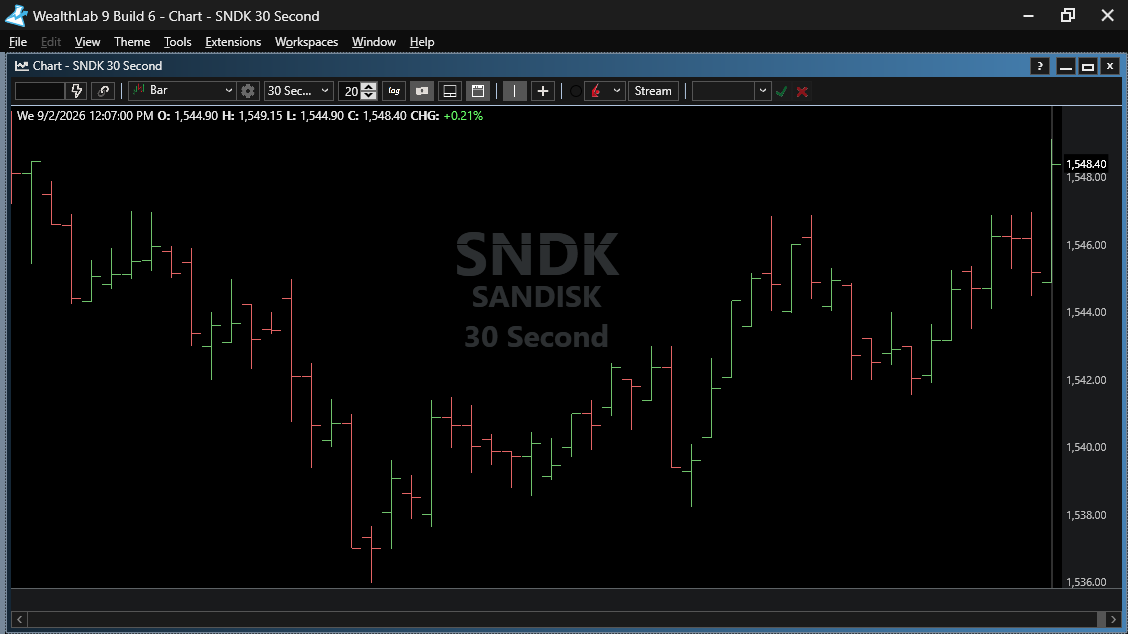
In the screenshot, 30-sec data is up-to-date but a simple 30 sec chart cuts off yesterday at 12:07 pm.

I'm not seeing the problem, and your chart is missing critical information at the bottom that might help me determine what you're seeing. And, are there any messages from IB in the Log Viewer? Always look there for clues.
Also, once a request from a Provider/Scale doesn't return data, it goes into the blacklist and will never be requested again for that session. There are 3 ways to get out of the blacklist:
1. Restart
2. Data Manager > Historical Providers > right click [Provider] > Clear Internal Request Tracking
3. Provider Bulk Update (e.g., Update Interactive Brokers)
Also, once a request from a Provider/Scale doesn't return data, it goes into the blacklist and will never be requested again for that session. There are 3 ways to get out of the blacklist:
1. Restart
2. Data Manager > Historical Providers > right click [Provider] > Clear Internal Request Tracking
3. Provider Bulk Update (e.g., Update Interactive Brokers)
Hello,
There is no abnormal message in logs. Right click on Historical Providers > Clear did not refill the missing gap, nor restart. Doing bulk update defeats the purpose and is not practical.
The only way to recreate the issue is to use it as in real world usage - over a few days during real-time streaming, and switching between a couple of tickers.
Here is a complete screen shot. The cursor is on 9/2 12:07 pm, right next to 9/3 start 9:30 am.
Please let me know if there is anything else. Thanks.
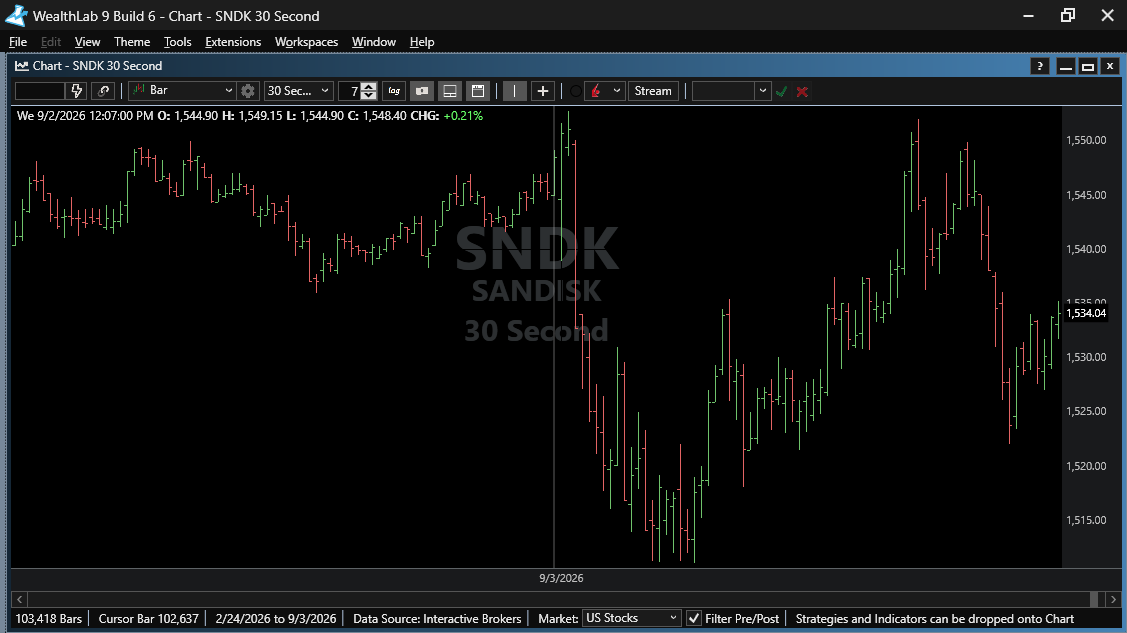
There is no abnormal message in logs. Right click on Historical Providers > Clear did not refill the missing gap, nor restart. Doing bulk update defeats the purpose and is not practical.
The only way to recreate the issue is to use it as in real world usage - over a few days during real-time streaming, and switching between a couple of tickers.
Here is a complete screen shot. The cursor is on 9/2 12:07 pm, right next to 9/3 start 9:30 am.
Please let me know if there is anything else. Thanks.
Does this chart show a problem?
The horizontal status bar is moved to the left. There are more bars to the right.
Re: the blacklist
I'm only suggesting that if there was a failure to return the historical data from a request, there's no use on continuing to try unless you take one of those actions. Any one will suffice to remove the Symbol/Scale from the blacklist, then you need to request the data again.
The horizontal status bar is moved to the left. There are more bars to the right.
QUOTE:I recommend that you restart WealthLab every day to refresh connections - especially with IB after it restarts.
over a few days during real-time streaming,
Re: the blacklist
I'm only suggesting that if there was a failure to return the historical data from a request, there's no use on continuing to try unless you take one of those actions. Any one will suffice to remove the Symbol/Scale from the blacklist, then you need to request the data again.
And, with that said.. I did see a problem after turning on the Pre/Post Filter - which made it clear that some data from yesterday was missing (all the data from today was present since 4am).
Looking into it!
Looking into it!
Hi, quick update - just checked latest updates (IB 904/WL 907) and noticed that they haven't filled the 30-sec bar gap from 9/2 to 9/3.
If I only knew how to make that happen.
Did the data just disappear? This is a week ago now. Had you seen that data before?
Did the data just disappear? This is a week ago now. Had you seen that data before?
To recreate it is use 30-sec during trading day/streaming while switching between a couple of tickers every so often.
The data never appeared in the first place and was never backfilled. Not via data manager or otherwise. The app just does not detect the gap.
As far as I know it only happens in 30-seconds.
The data never appeared in the first place and was never backfilled. Not via data manager or otherwise. The app just does not detect the gap.
As far as I know it only happens in 30-seconds.
If a gap exists, it will never be filled.
You need to truncate the data using the Data Manager > Data Tool.
Select the scale at the top and the DataSet containing the symbol(s), select, Perform Truncation.
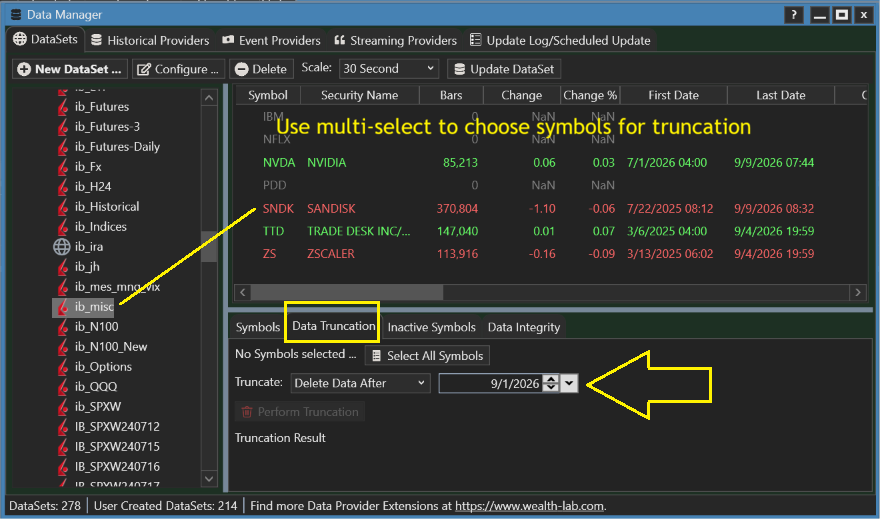
You need to truncate the data using the Data Manager > Data Tool.
Select the scale at the top and the DataSet containing the symbol(s), select, Perform Truncation.
Clearly - the app is creating gaps. So it should be smart enough to detect and remedy.
That will force me not to trust the data and trunacate on daily basis.
*********** That's a hugh problem! *************
That will force me not to trust the data and trunacate on daily basis.
*********** That's a hugh problem! *************
Just noticed a gap in 1-minute too...
Also, after truncating, I run a strategy with 1-min for the past X months - it only get the last data from 8/7. I end up manually deleting the QX file from disk and running a blank strategy for the length and bar interval needed.
Just to clarify, it does not detect and backfill gaps.
Also, after truncating, I run a strategy with 1-min for the past X months - it only get the last data from 8/7. I end up manually deleting the QX file from disk and running a blank strategy for the length and bar interval needed.
Just to clarify, it does not detect and backfill gaps.
If there's a gap, there will be no way to fill it. See Post #17.
WealthLab sends requests to Providers to start requesting from the last bar of data, or before the first bar is more history is required. There's no functions to put data in the middle or auto-detect if it's missing. It's normal for "gaps" to be present in intraday data - but that's not to say that it's normal to be missing bars available from the provider.
Now, once you've done the truncation, WL's tracking of requests can make it difficult to add data during the same session. It's best to update the DataSet in Data Manager at that point. If the bars aren't updated from some reason, there's no other choice than to try again after restarting WL.
WealthLab sends requests to Providers to start requesting from the last bar of data, or before the first bar is more history is required. There's no functions to put data in the middle or auto-detect if it's missing. It's normal for "gaps" to be present in intraday data - but that's not to say that it's normal to be missing bars available from the provider.
Now, once you've done the truncation, WL's tracking of requests can make it difficult to add data during the same session. It's best to update the DataSet in Data Manager at that point. If the bars aren't updated from some reason, there's no other choice than to try again after restarting WL.
I'll just add that however uncommon, we may request data and not get a response for any number of reasons. But one reason would be most common with IB - timing out.
IB requires us to split requests into many parts to build a history. If one of those parts doesn't come back, a gap could form. We have to balance the number of days in a request with the number of bars we expect to receive and with the amount of time to "give up" on a response never returning - currently we wait up to 90 seconds for each batch.
I rarely see one of these requests fully timeout, but it seems that it could be more common for you. The next time you see a gap, check the IB messages in the Log Viewer for this: "[symbol] request timeout; batch [some number]";
If you find this smoking gun, for finer intervals we could request less for each batch or could lengthen the timeout - or even make the timeout configurable for each user.
IB requires us to split requests into many parts to build a history. If one of those parts doesn't come back, a gap could form. We have to balance the number of days in a request with the number of bars we expect to receive and with the amount of time to "give up" on a response never returning - currently we wait up to 90 seconds for each batch.
I rarely see one of these requests fully timeout, but it seems that it could be more common for you. The next time you see a gap, check the IB messages in the Log Viewer for this: "[symbol] request timeout; batch [some number]";
If you find this smoking gun, for finer intervals we could request less for each batch or could lengthen the timeout - or even make the timeout configurable for each user.
I wrote a script that found lots of gaps. In all intervals. So I updated the script to also backfill them. It took me lots of time and effort...
Moving forward, I will have no choice but to run it each and every day.
Gentlemen, price data fidelity is the most important thing Wealth-Lab must and should deliver!
Every other bell and whistle is dwarfed compared to it.
Moving forward, I will have no choice but to run it each and every day.
Gentlemen, price data fidelity is the most important thing Wealth-Lab must and should deliver!
Every other bell and whistle is dwarfed compared to it.
Your Response
Post
Edit Post
Login is required