Hello,
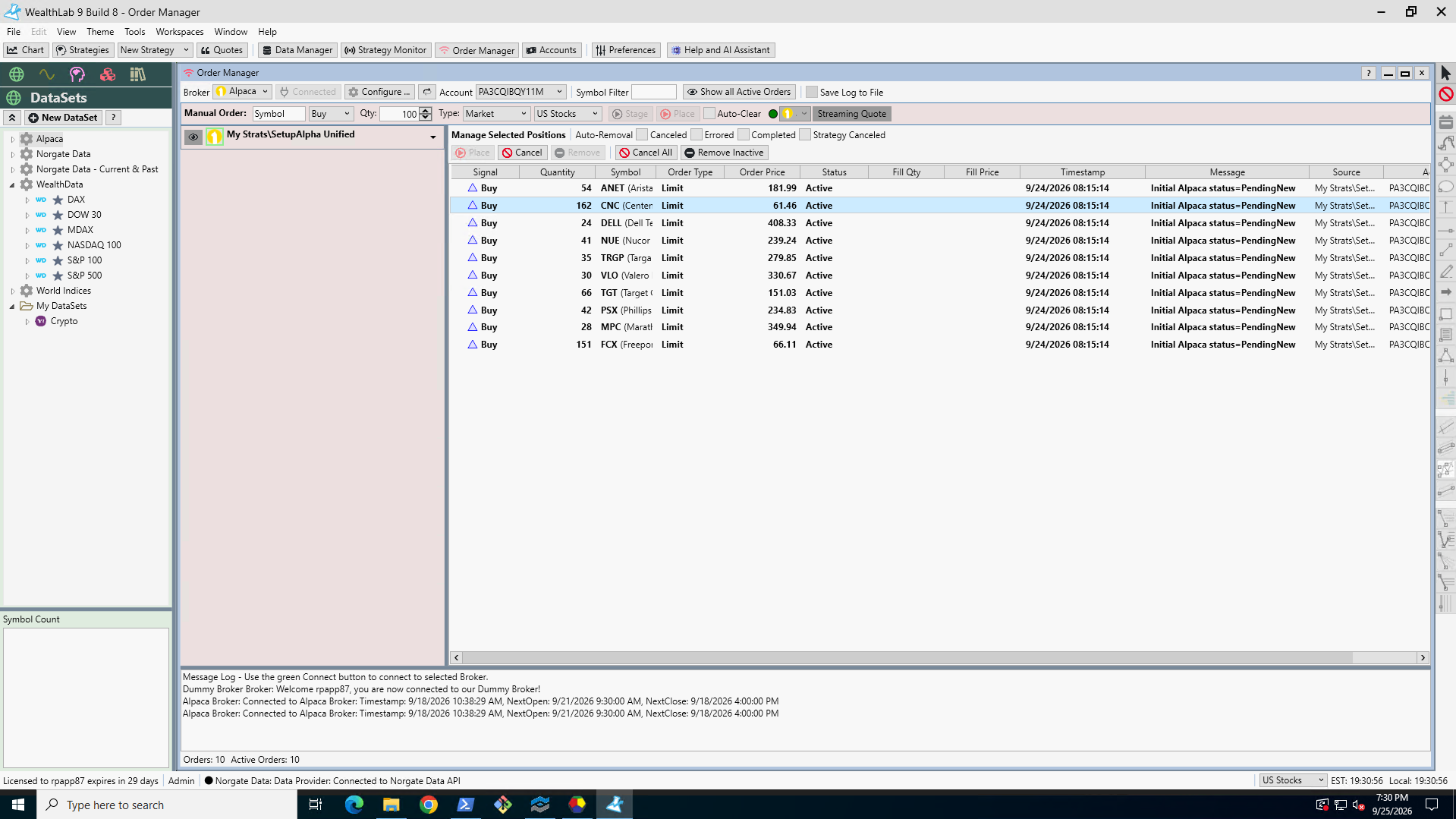
I am new to Wealth lab, testing an S&P 500 daily strategy I have from a python environment and used AI to convert it to WL9 C#. I've only been running it a few days against alpaca paper, and I noticed a first real issue which halted the strategy. The strategy scans norgate data and runs daily at 8:15am, and submits DAY only limit entries against symbols that meet the criteria. On 9/24 it submitted limits on 10 symbols in paper, 1 entry was filled, and when I checked WL today the order manager still shows those orders as pending new, while the alpaca dashboard shows them expired. Also, the alpaca dashboard has the 1 position on, while WL doesn't show anything. This position mismatch prevented my strategy from executing on 9/25. While my python strategy running on the same norgate data had 10 additional new entry orders that WL did not process.
My question is, when do these order statuses and positions get updated in WL9? It can't be practical to hit "request updates from brokers" every day. It was only after hitting that button my single position showed up in broker positions. And only after restarting WL did the pending orders disappear completely from the WL order manager screen.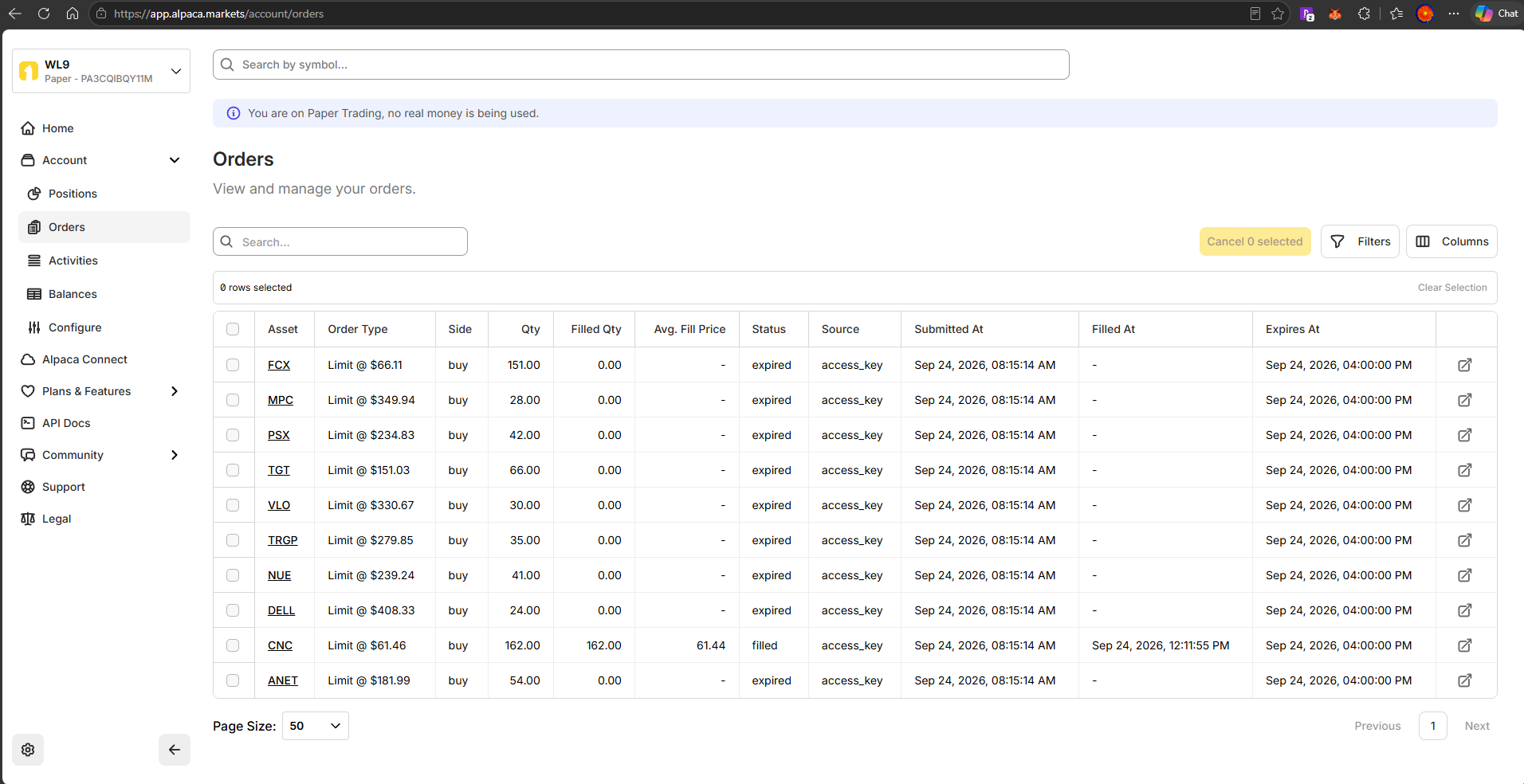
Thanks!
I am new to Wealth lab, testing an S&P 500 daily strategy I have from a python environment and used AI to convert it to WL9 C#. I've only been running it a few days against alpaca paper, and I noticed a first real issue which halted the strategy. The strategy scans norgate data and runs daily at 8:15am, and submits DAY only limit entries against symbols that meet the criteria. On 9/24 it submitted limits on 10 symbols in paper, 1 entry was filled, and when I checked WL today the order manager still shows those orders as pending new, while the alpaca dashboard shows them expired. Also, the alpaca dashboard has the 1 position on, while WL doesn't show anything. This position mismatch prevented my strategy from executing on 9/25. While my python strategy running on the same norgate data had 10 additional new entry orders that WL did not process.
My question is, when do these order statuses and positions get updated in WL9? It can't be practical to hit "request updates from brokers" every day. It was only after hitting that button my single position showed up in broker positions. And only after restarting WL did the pending orders disappear completely from the WL order manager screen.
Thanks!
Rename
I think this is a bug that caused by reconnecting to the broker without having restarted WealthLab and/or without WL having received a refresh for live orders on reconnection.
For now, just hit Cancel All Orders at the end of the day to make sure WealthLab knows there aren't any live orders. You can do that now, but I suspect that those orders will stick at "Pending Cancel" since they no longer exist. In that case, select all the orders, right click > Kill Selected.
fwiw, I always recommend a fresh start for WealthLab each day to refresh broker connections, etc.
For now, just hit Cancel All Orders at the end of the day to make sure WealthLab knows there aren't any live orders. You can do that now, but I suspect that those orders will stick at "Pending Cancel" since they no longer exist. In that case, select all the orders, right click > Kill Selected.
fwiw, I always recommend a fresh start for WealthLab each day to refresh broker connections, etc.
Thanks for the feedback. I see somebody reported something similar previously here https://www.wealth-lab.com/Discussion/Alpaca-Integration-9448
With this kind of bug where we are unable to keep the order status and positions aligned, I think I am going to have to abandon this platform and continue developing my python system with new additional strategies instead. Given I travel a lot, and am in different countries, time zones, all over, I cannot always restart an application such as WL on a daily basis. Can't have my human input interfere with missing trades.
With this kind of bug where we are unable to keep the order status and positions aligned, I think I am going to have to abandon this platform and continue developing my python system with new additional strategies instead. Given I travel a lot, and am in different countries, time zones, all over, I cannot always restart an application such as WL on a daily basis. Can't have my human input interfere with missing trades.
I called it a bug, but only recently identified the scenario in which it occurs. We'll get it resolved.
Thank you, is this specific to Alpaca? Do you know if the Schwab integration has the same type of issue?
Cone, can you offer any more details about the bug you mentioned? From my experience I’ve found the Alpaca paper API sporadically unstable, for example it doesn’t return timely order statuses or they are significantly lagged. But regardless, I’m going to begin a new Alpaca paper and run all
my strategies daily starting tomorrow. If it’s something happening at WL’s end we’ll resolve it.
my strategies daily starting tomorrow. If it’s something happening at WL’s end we’ll resolve it.
To answer both of you, I believe it to be the same issue as the one I recently mentioned privately (to Glitch) with IB.
When the IB client (TWS) restarts, WealthLab is initializing the Order Manager with the PersistedOrders instead of those from BrokerBase.GetActiveOrders(). Now, the IB Provider has a bit of a timing issue with that method, so I'm working on that separately.
The symptom described by rpapp87 is the same for Alpaca. Since Alpaca doesn't have a local client that needs to restart like IB, it's not as clear when this would occur. However, all brokers reset connections at least once (often several times) each day, so that reconnection could be having the same effect.
We definitely process an 'Expired' order from Alpaca as a Cancel.
What I expect you'd see is this:
1. All orders will show as Canceled in the Order Manager when Alpaca sets Expired.
2. If you leave WealthLab open (all night), PersistedOrders isn't updated.
3. When the broker connection resets, the Active orders re-appear.
When the IB client (TWS) restarts, WealthLab is initializing the Order Manager with the PersistedOrders instead of those from BrokerBase.GetActiveOrders(). Now, the IB Provider has a bit of a timing issue with that method, so I'm working on that separately.
The symptom described by rpapp87 is the same for Alpaca. Since Alpaca doesn't have a local client that needs to restart like IB, it's not as clear when this would occur. However, all brokers reset connections at least once (often several times) each day, so that reconnection could be having the same effect.
We definitely process an 'Expired' order from Alpaca as a Cancel.
What I expect you'd see is this:
1. All orders will show as Canceled in the Order Manager when Alpaca sets Expired.
2. If you leave WealthLab open (all night), PersistedOrders isn't updated.
3. When the broker connection resets, the Active orders re-appear.
Your Response
Post
Edit Post
Login is required