
Discord Extension
The WealthLab Discord extension lets you publish WealthLab strategy signals directly to a channel on your Discord server. This is useful for sharing trading signals with a private group, community, or subscription-based channel.
The extension uses Discord's Incoming Webhooks feature. A webhook is associated with a specific Discord channel and allows WealthLab to post messages to that channel without requiring a Discord bot, Discord login, or any additional authentication.
Discord Accounts
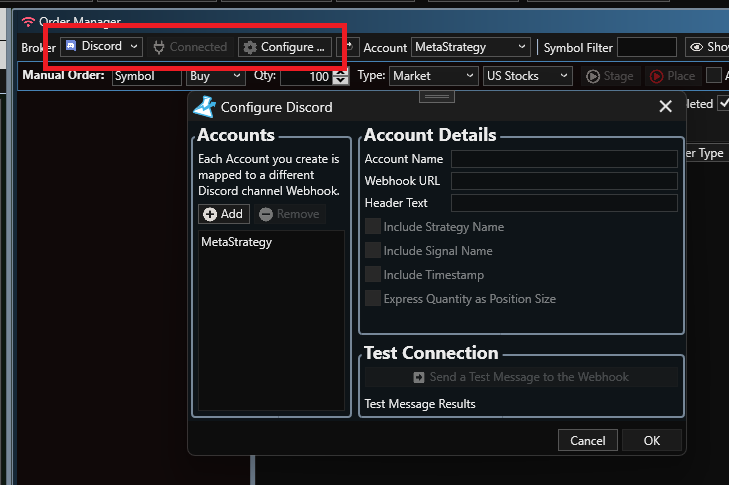
The Discord extension appears as a Broker in WealthLab. Before you can publish strategy signals, configure at least one Discord Account. Each Account represents a destination Discord channel and is associated with that channel through its unique Webhook URL. You can create multiple Accounts to publish signals to different Discord channels. For example, you might create separate Accounts for:
A private subscriber or Patreon channel
A public signals channel
A testing channel
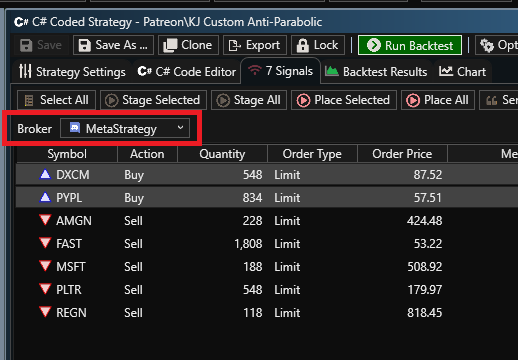
When configuring a Strategy to publish signals to Discord, select the appropriate Discord Account just as you would select an account for another Broker.
Creating a Discord Webhook
Before configuring your Discord Account in WealthLab, create a webhook for the Discord channel where you want the signals to appear. You must have sufficient permissions on the Discord server to manage webhooks. Discord's Manage Webhooks permission controls whether a member can create, edit, and delete webhooks.
To create a webhook:
Open Discord and select the server where you want WealthLab to publish signals.
Open Server Settings.
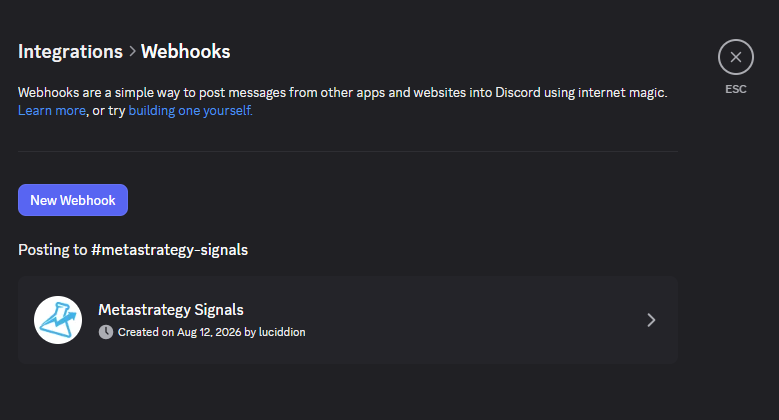
Select Integrations.
Select Webhooks or click Create Webhook.
Give the webhook a descriptive name, such as WealthLab Signals.
Select the text channel where you want WealthLab signals to appear.
Optionally assign an avatar to the webhook.
Click Copy Webhook URL.
Discord lets you select the destination channel while configuring the webhook, and the resulting URL can then be used by an external application such as WealthLab to post messages to that channel.
Private and Members-Only Channels
The webhook can be associated with a private or members-only Discord channel. For example, if you have a #Patreon channel that is visible only to members with a particular Discord role, you can create the webhook for that channel. WealthLab can then publish signals there while the channel's existing Discord permissions continue to determine which members can view it.
Configuring an Account in WealthLab
Create a Discord Account in the extension and enter the Webhook URL you copied from Discord. The Account configuration includes:
Account Name
A descriptive name for the destination, such as Patreon Signals. This is the name that appears when selecting a Discord Account elsewhere in WealthLab.
Webhook URL
The URL generated by Discord for the destination channel. This is the only information WealthLab needs to authenticate and publish messages through the Incoming Webhook.
Header Text
Optional text that identifies or describes the signal feed.
Include Strategy Name
When enabled, the WealthLab Strategy that generated the signal is included with each Discord signal.
Include Signal Name
When enabled, the Strategy's Signal Name is included with the Discord signal.
Include Timestamp
When enabled, a timestamp is included with each signal.
Express Quantity as Position Size
When enabled, WealthLab expresses the signal quantity using the Strategy's position size rather than the calculated number of shares.
For example, instead of publishing:
BUY 1,234 NVDA @ MARKET
the Discord signal might display:
BUY 5% of Equity NVDA @ MARKET
This is particularly useful when sharing signals with other traders because each recipient can size the trade according to their own account equity instead of attempting to reproduce a share quantity calculated for a different account size. When this option is disabled, WealthLab publishes the actual share quantity associated with the signal.
Testing the Webhook
After entering the Webhook URL, use the Test feature to verify the connection. WealthLab will submit a test message to the associated Discord channel.
Publishing Strategy Signals
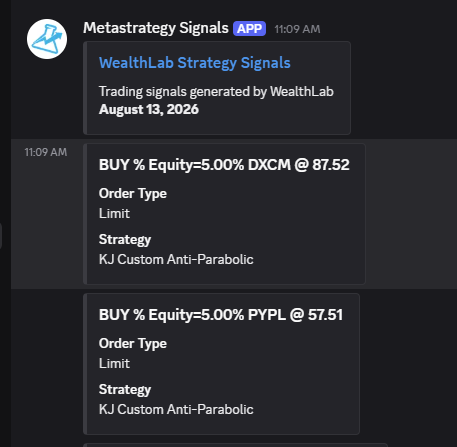
Once an Account has been configured, select Discord as the Broker and choose the desired Discord Account when configuring signal publishing in WealthLab. When a Strategy generates signals that are submitted to the Discord Broker, WealthLab publishes them to the channel associated with the Account's Webhook URL. Signals are formatted as Discord embeds so that the important order information is immediately visible. With share quantities enabled, a signal might appear similar to:
BUY 1,234 NVDA @ MARKET
Order Type
Market
Strategy
KJ Custom
Signal
RSI Entry
With Express Quantity as Position Size enabled, the same signal could instead appear as:
BUY 5% of Equity NVDA @ MARKET
Order Type
Market
Strategy
KJ Custom
Signal
RSI Entry
Limit and stop orders include their associated order price.
Multiple Discord Channels
You can create as many Discord Accounts as needed. To publish signals to another Discord channel, create another webhook in Discord for that channel and create another Account in the WealthLab Discord extension using the new Webhook URL.
For example:
Patreon Signals?#PatreonPublic Signals?#signalsTest Signals?#testing
Each Account can have its own signal display options, including whether quantities are published as shares or as position size. Each webhook determines its destination channel, so WealthLab does not require a Discord Server ID or Channel ID.
Webhook Security
Keep your Webhook URL private.
The Webhook URL contains the token required to publish messages through the webhook. Anyone who obtains the complete URL can potentially use it to post messages through that webhook without additional authentication. Do not post your Webhook URL in a Discord message, forum post, screenshot, or other public location. If you believe a Webhook URL has been exposed, delete the webhook in Discord and create a new one. Then update the corresponding Discord Account in WealthLab with the new URL.
Managing the Webhook in Discord
You can return to Server Settings ? Integrations ? Webhooks at any time to manage your WealthLab webhook. From there, Discord allows you to change its name, avatar, destination channel, copy its URL, or delete it. Deleting a webhook or otherwise invalidating its URL prevents the corresponding WealthLab Discord Account from publishing additional signals until it is configured with a valid Webhook URL.
Screenshots
Change Log
- Initial release.