Hi, I can't add a database at all, it always shows "The Ascii file failed to load any historical data", what could be the problem?
Rename
Any number of things. Start by telling us what the "database" files consist of, how they are named (e.g. AAPL.txt), and post an example of the first few lines in one of the files. Hit the CODE buttom and paste it between the CODE tags.
The files are named (Example: ABEV_B_0_60min.csv).
The code is like this:
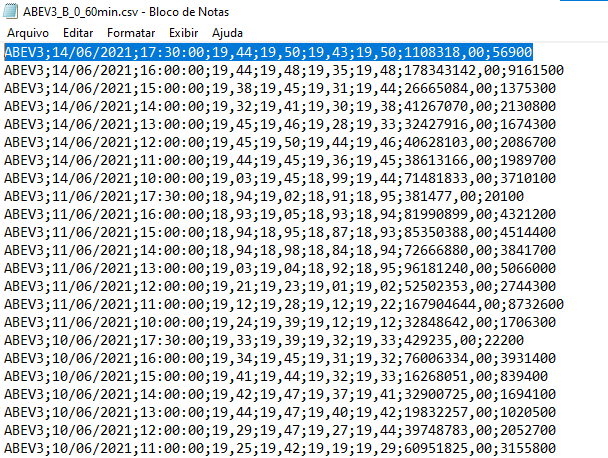
The code is like this:
CODE:
ABEV3;14/06/2021;17:30:00;19,44;19,50;19,43;19,50;1108318,00;56900
Okay, shouldn't be a problem if all the files follow the same format.
Go to the DataSets on the left panel, right click your ASCII set, then Configure. Let's see what that looks like.
Go to the DataSets on the left panel, right click your ASCII set, then Configure. Let's see what that looks like.
In the "My DataSets" folder, only the following appears: Crypto
"Problem dataset" in the title implies you created a DataSet. But apparently it doesn't exist yet. Let's start over
When does it show "The Ascii file failed to load any historical data"?
If this is the result of configuring the Ascii DataSet, then it's just not configured properly.
Try again, and if you have the same problem show us the settings you put.
====
Separately, the symbol name in WealthLab will be the name of the file: e.g., ABEV3_B_0_60min
Pretty ugly symbol to be working with. If possible, I'd recommend you organize your data in folders named like Daily, 60-Minute, 5-Minute, etc. This information doesn't need to be in the filename.
When does it show "The Ascii file failed to load any historical data"?
If this is the result of configuring the Ascii DataSet, then it's just not configured properly.
Try again, and if you have the same problem show us the settings you put.
====
Separately, the symbol name in WealthLab will be the name of the file: e.g., ABEV3_B_0_60min
Pretty ugly symbol to be working with. If possible, I'd recommend you organize your data in folders named like Daily, 60-Minute, 5-Minute, etc. This information doesn't need to be in the filename.
Your Response
Post
Edit Post
Login is required