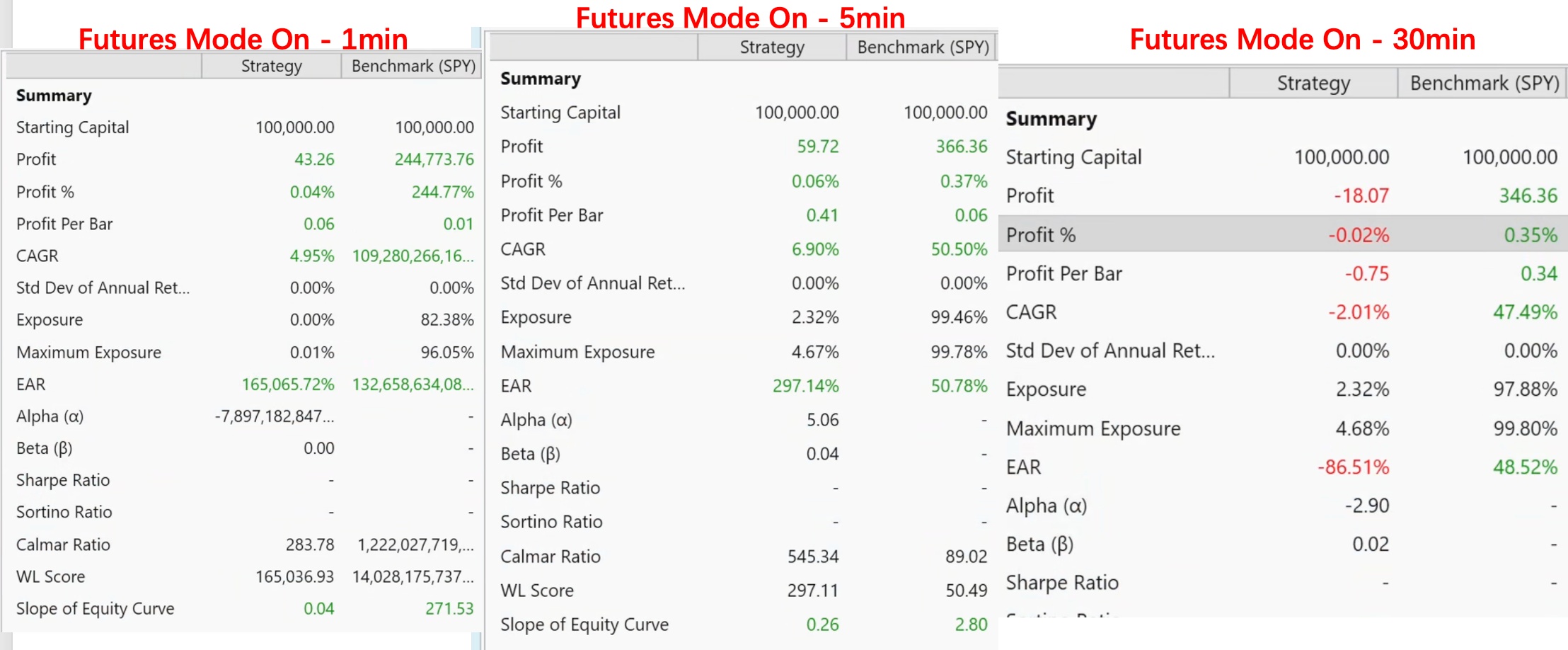
When testing minute-level strategies, I found that when Futures Mode is checked, regardless of whether SPY is used as a Symbol or Benchmark, the backtest results are abnormal.
And it also significantly affects the time required for backtesting when spy used as Benchmark.
I observed the same phenomenon in Wealth Lab 8 and 9, and my minute data comes from Iqfeed.
Below are some screenshots:
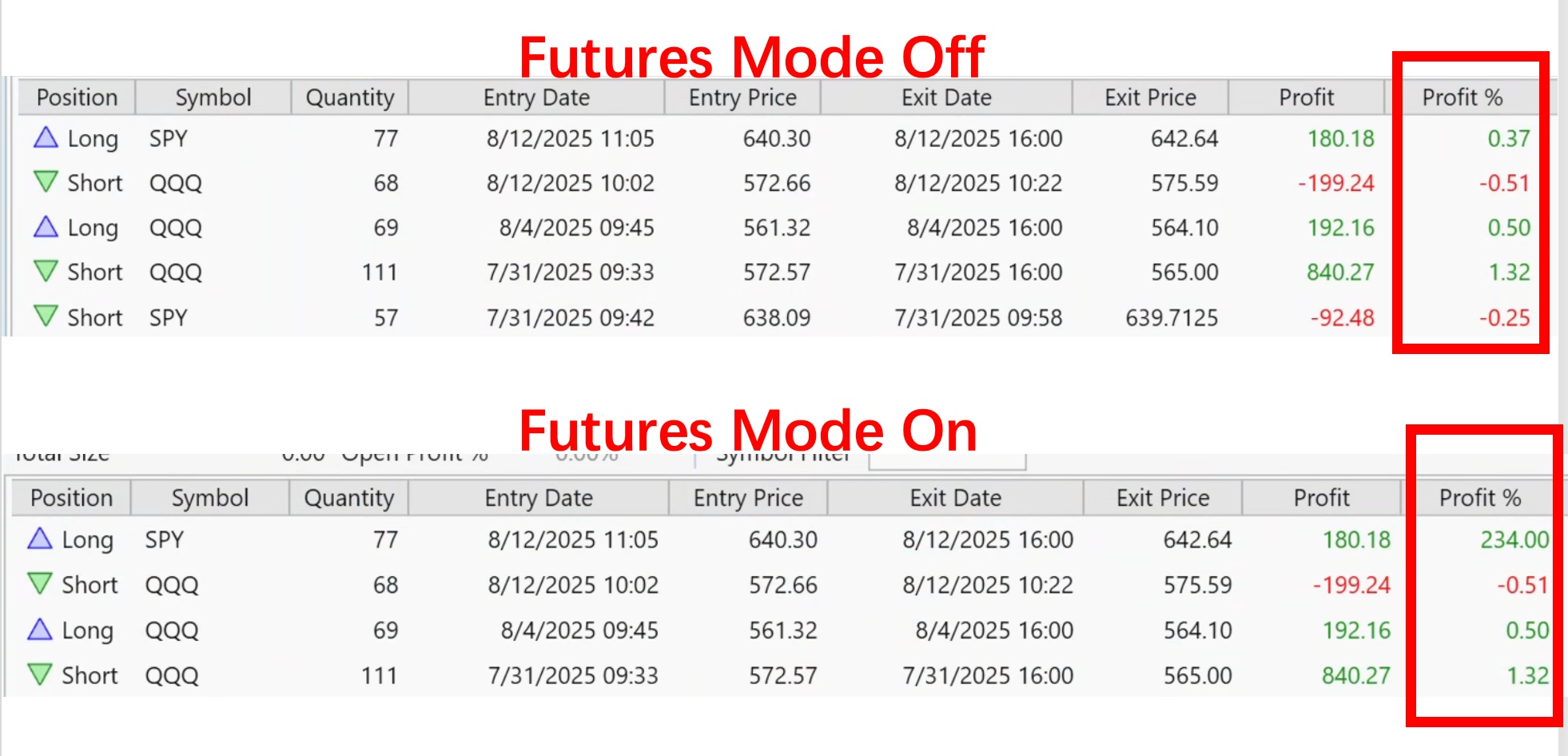
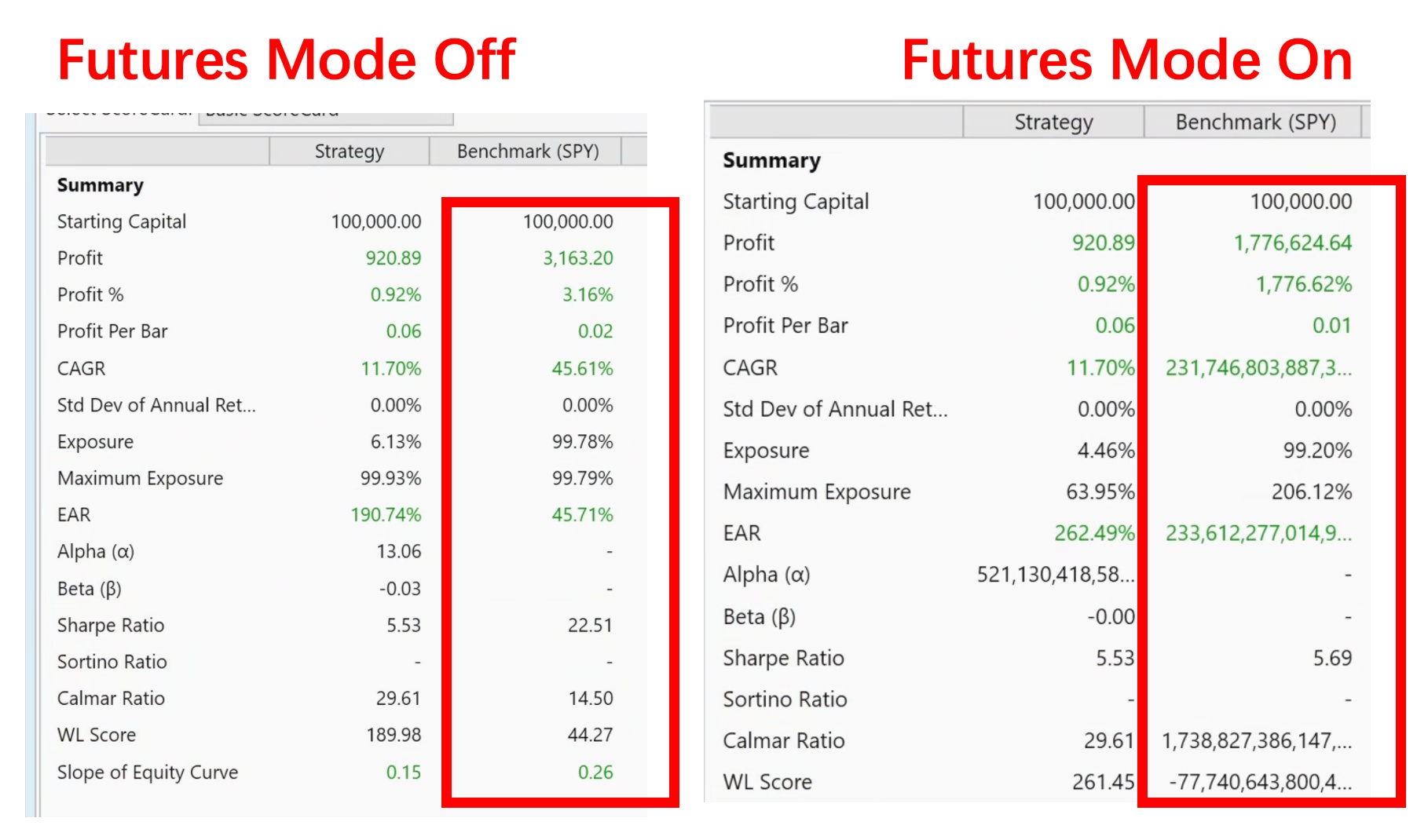
And it also significantly affects the time required for backtesting when spy used as Benchmark.
I observed the same phenomenon in Wealth Lab 8 and 9, and my minute data comes from Iqfeed.
Below are some screenshots:
Rename
Do you have SPY defined as a symbol in your Markets and Symbols tool?
Hi Glitch,
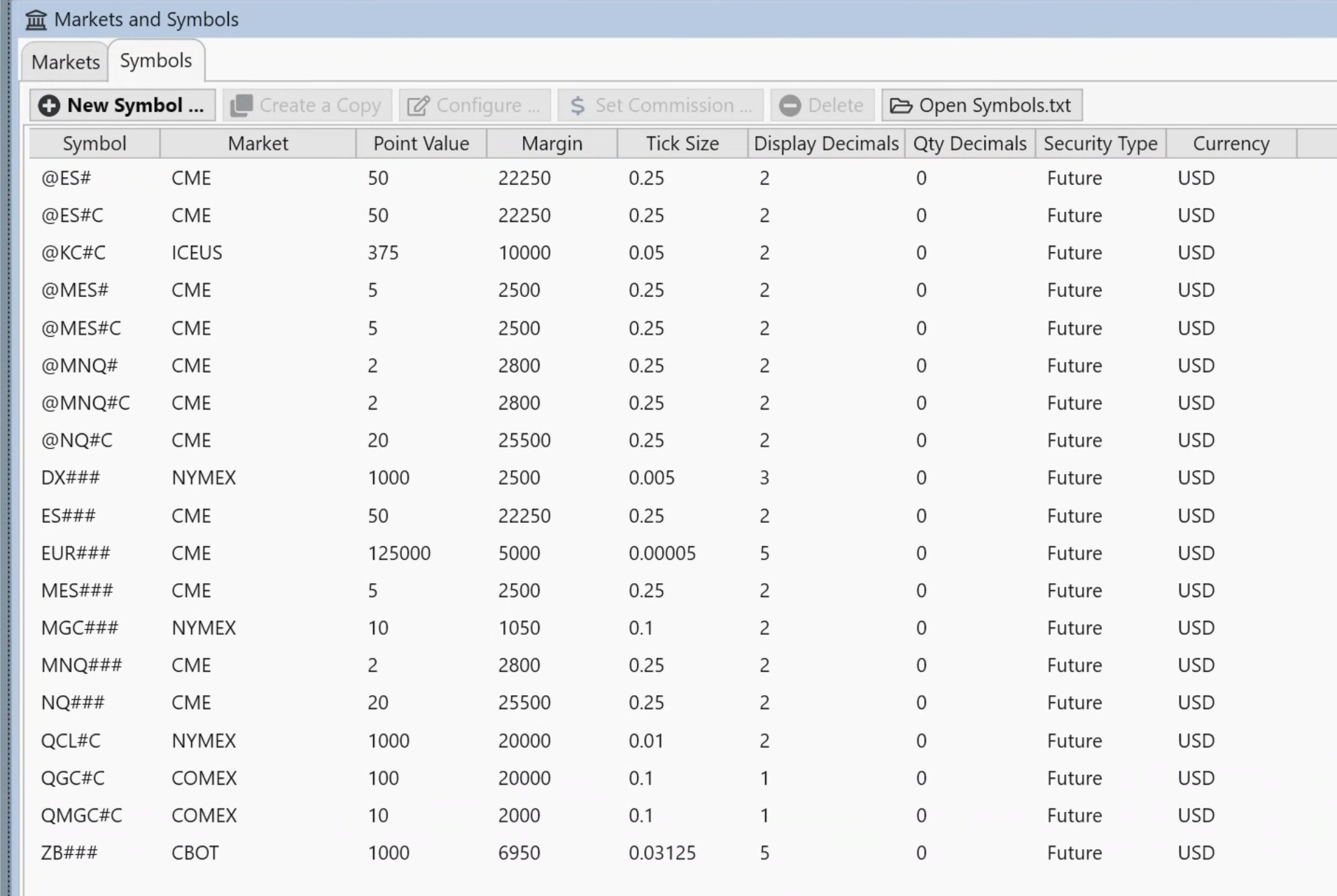
I have checked this setting and it should not have any SPY or other codes that might be misidentified.
I have not used the migrate feature, WL9 has been set up completely from scratch, as shown in the screenshot below:
And even with a completely empty Block strategy, I could reproduce this issue
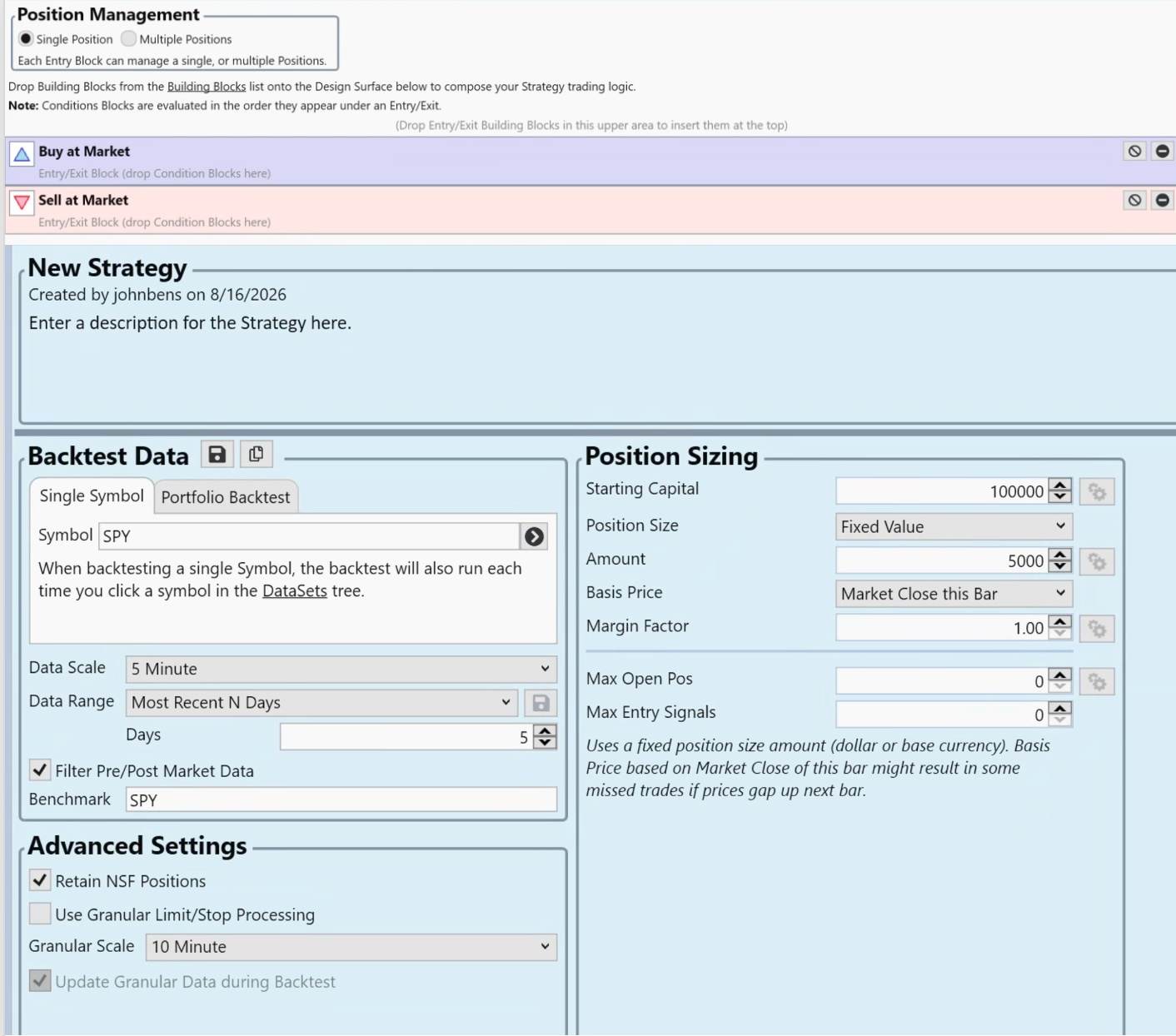
and it seems that the problem only appears on 1-minute data.
I have checked this setting and it should not have any SPY or other codes that might be misidentified.
I have not used the migrate feature, WL9 has been set up completely from scratch, as shown in the screenshot below:
And even with a completely empty Block strategy, I could reproduce this issue
and it seems that the problem only appears on 1-minute data.
The Provider must be assigning it to Futures.
Which provider is it?..
IQFeed. Yes, I've seen that happen before too, possibly caused by temporarily having made SPY a Futures symbol. Here's how to fix it...
Open SPY in a chart for each affected scale, right click the chart > Reload Data from Provider.
Fixed.
Which provider is it?..
IQFeed. Yes, I've seen that happen before too, possibly caused by temporarily having made SPY a Futures symbol. Here's how to fix it...
Open SPY in a chart for each affected scale, right click the chart > Reload Data from Provider.
Fixed.
Run this strategy on a 1 minute SPY and report back what the Debug window contains.
CODE:

using WealthLab.Backtest;
using System;
using WealthLab.Core;
using WealthLab.Data;
using WealthLab.Indicators;
using System.Collections.Generic;

namespace WealthScript2
{
    public class MyStrategy : UserStrategyBase
    {
        //create indicators and other objects here, this is executed prior to the main trading loop
        public override void Initialize(BarHistory bars)
        {
         WriteToDebugLog(bars.DataSource);
         if (bars.SymbolInfo == null)
            WriteToDebugLog("NULL");
         else
         {
            WriteToDebugLog(bars.SymbolInfo.SecurityType);
            WriteToDebugLog(bars.SymbolInfo.Margin);
            WriteToDebugLog(bars.SymbolInfo.PointValue);
            WriteToDebugLog(bars.SymbolInfo.TickSize);
         }
        }

        //execute the strategy rules here, this is executed once for each bar in the backtest history
        public override void Execute(BarHistory bars, int idx)
        {
            if (!HasOpenPosition(bars, PositionType.Long))
            {
                //code your buy conditions here
            }
            else
            {
                //code your sell conditions here
            }
        }

        //declare private variables below

    }
}
Hi Glitch & Cone,
I solved this problem using Cone's method in Wealth Lab 9.
I ran the script given by Glitch in WL8, and the log I got is like this:
---Symbol by Symbol Debug Logs---
---SPY---
IQFeed
Future
1
1
0
I solved this problem using Cone's method in Wealth Lab 9.
I ran the script given by Glitch in WL8, and the log I got is like this:
---Symbol by Symbol Debug Logs---
---SPY---
IQFeed
Future
1
1
0
Glad to hear it's solved!
Hi Glith & Cone,
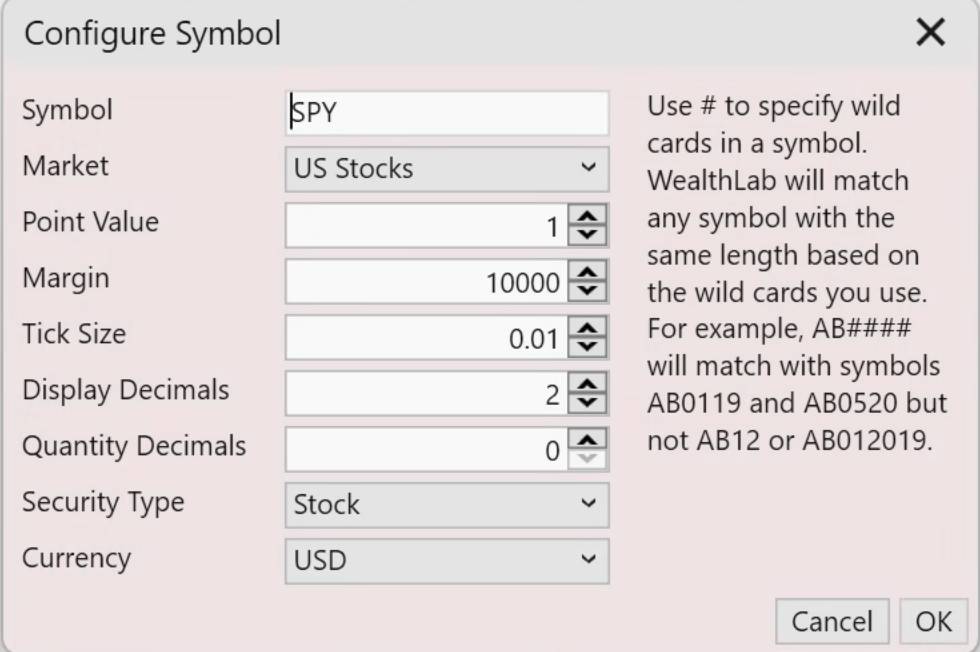
This issue has appeared again today. However, Cone's method is also not working. After I tried reloading the data, the system still identified SPY as Future.
I tried to define SPY as Stocks in Markets and Symbols, which can solve this problem, but I'm not quite sure if the Margins set here will affect the backtest.
This issue has appeared again today. However, Cone's method is also not working. After I tried reloading the data, the system still identified SPY as Future.
I tried to define SPY as Stocks in Markets and Symbols, which can solve this problem, but I'm not quite sure if the Margins set here will affect the backtest.
It shouldn't make a difference as a stock, but use Margin $1.
Aside, maybe you missed a file. Go to your User Data folder > IQFeed > then in each of the scale folders, delete the SPY.QX files.
Meannwhile, I'll look to see if there's a reason why the IQFeed Provider would declare that SPY is a futures symbol.
... and it's certainly not obvious why this would happen.
1. Do you test with futures?
2. Do you typically use SPY as a benchmark?
Aside, maybe you missed a file. Go to your User Data folder > IQFeed > then in each of the scale folders, delete the SPY.QX files.
Meannwhile, I'll look to see if there's a reason why the IQFeed Provider would declare that SPY is a futures symbol.
... and it's certainly not obvious why this would happen.
1. Do you test with futures?
2. Do you typically use SPY as a benchmark?
@Cone,
Yes, I did some tests after adding SPY in markets and Symbols, and it seems margin does not affect any test results, so this issue can be resolved for now.
At the same time, I will try the method you mentioned for deleting the QX file.
Yes, I do tests on Futures, and I have set SPY as the default benchmark, so when testing Futures, SPY will also be benchmark.
Yes, I did some tests after adding SPY in markets and Symbols, and it seems margin does not affect any test results, so this issue can be resolved for now.
At the same time, I will try the method you mentioned for deleting the QX file.
Yes, I do tests on Futures, and I have set SPY as the default benchmark, so when testing Futures, SPY will also be benchmark.
okay, thanks. It should be okay; I'm just trying to imagine how SPY is being assigned as a future. As I've mentioned, I too have seen this in the past but have always chalked it up to my continual re-configurations for testing.
Your Response
Post
Edit Post
Login is required